Baue gerade zurück auf iceman voll Kupfer mit ek Monarch x2 Block.Das war auch der Grund warum ich das nicht gemacht habe, sowas kann nicht in einem Loop funktionieren. Ob du 30°C SPD Temp oder 35°C SPD hast ist eh egal.
Der Iceman Dual-Dimm Block mindert den Durchfluss um ca. 40L/h, was noch OK ist.
Iceman Kupfer Version ist den Preis auch nicht wert. Für max. 1°C weniger
Install the app
How to install the app on iOS
Follow along with the video below to see how to install our site as a web app on your home screen.

Anmerkung: this_feature_currently_requires_accessing_site_using_safari
-
Sicherheitsmaßnahme! Bitte ändere dein Forum-Passwort. Siehe Beitrag
-
Hardwareluxx führt derzeit die Hardware-Umfrage 2026 (mit Gewinnspiel) durch und bittet um eure Stimme. Unter allen Teilnehmern verlosen wir eine aktuelle Grafikkarte Eurer Wahl bis 1099 EUR.
Du verwendest einen veralteten Browser. Es ist möglich, dass diese oder andere Websites nicht korrekt angezeigt werden.
Du solltest ein Upgrade durchführen oder einen alternativen Browser verwenden.
Du solltest ein Upgrade durchführen oder einen alternativen Browser verwenden.
[Sammelthread] Ryzen DDR5 RAM OC Thread
- Ersteller Reous
- Erstellt am


- Mitglied seit
- 20.01.2017
- Beiträge
- 4.970
- Ort
- am Rhein
- Desktop System
- Gaming | Büro
- Laptop
- MacBook Air M5 10/10 24 GiB 1 TiB
- Details zu meinem Desktop
- Prozessor
- 9800X3D | 7950X
- Mainboard
- X870E Nova, OCF | B850 Steel Legend
- Kühler
- Freezer 36 | Core 1 + SuperNova
- Speicher
- 6400-26 | 6600-26
- Grafikprozessor
- 6900 LC | 9070 XT
- Display
- LG 55 Zoll 4K | 3440x1440 + 2560x1440
- Gehäuse
- Fractal North | BQ Silent Base 802
- Netzteil
- BQ 1000W | Corsair 1000W
So, jetzt läuft auch Karhu sauber durch. Könnte tRP=34 oder VDD=1.53V gewesen sein. Ich glaub eher ersteres, weil das hatte ich jetzt die Tage immer und jedesmal Probleme mit Karhu. Danke @RedF - auch @gupsterg hatte das in seinem Mega-Guide im OCN so geschrieben. Jetzt werd ich nochmal etwas die Spannungen drücken.


Tatilica
Experte
- Mitglied seit
- 10.06.2020
- Beiträge
- 198
- Ort
- Romania
- Desktop System
- Tatili
- Details zu meinem Desktop
- Prozessor
- Ryzen 9900x3D
- Mainboard
- X870 TOMAHAWK Wifi
- Kühler
- ID Cooling FX240 PRO Black
- Speicher
- Gskill Neo 8000Mhz CL38
- Grafikprozessor
- Asus ProArt OC RTX 4070Super
- Display
- Asus Rog Swift 1440p/165hz
- SSD
- Corsair MP700 PRO 1TB PCI-e 5.0 x4.0
- Gehäuse
- Montech Sky Two GX
- Netzteil
- Corsair 2024 RM1000x ATX 3.1
- Betriebssystem
- Windows 11
Agesa 1.2.0.3c on MSI was notorious for those freezes or losted saved Profiles in vain ☹️BTW, one more thing, a warning to MSI owners:
I mentioned yesterday that my UEFI was freezing regularly again. I think I've fixed that now; it might have been something to do with voltage, as someone mentioned yesterday.
If it freezes, keep your hands off the six profile storage slots! Yesterday and today, I experienced this several times again: the board tends to freeze the moment I save a profile. Then I can only continue by pressing the reset button, and when I go back into the profile menu, all six are deleted.
I had the same problem once with an MSI board, I think an X670E Tomahawk, which annoyed me so much that I switched to the ASRock Nova.
Never happened after with "e" or "f" i've tested all beta released so far, just but same Profile goes no more stable on none, guess what .... 1.2.0.3a patchA back saves me ... again
Zuletzt bearbeitet:
- Mitglied seit
- 20.01.2017
- Beiträge
- 4.970
- Ort
- am Rhein
- Desktop System
- Gaming | Büro
- Laptop
- MacBook Air M5 10/10 24 GiB 1 TiB
- Details zu meinem Desktop
- Prozessor
- 9800X3D | 7950X
- Mainboard
- X870E Nova, OCF | B850 Steel Legend
- Kühler
- Freezer 36 | Core 1 + SuperNova
- Speicher
- 6400-26 | 6600-26
- Grafikprozessor
- 6900 LC | 9070 XT
- Display
- LG 55 Zoll 4K | 3440x1440 + 2560x1440
- Gehäuse
- Fractal North | BQ Silent Base 802
- Netzteil
- BQ 1000W | Corsair 1000W
Oh, interesting!
1. Now I can reproduce one of these UEFI freezes: VDDP=1,17V all fine -> go down to 1,15V the UEFI freezes when I reboot: press F10, then confirm and the system freezes and won't reboot. If I press reset and come back to the UEFI, no changes have been applied. Crazy, but good to know.
2. @Tatilica please better explain, did you install "e" and/or "f" and afterwards you were able to roll back to "a"? How? I made the same experience with my ASRock Nova, installed "e" and my 6400-26 profile was instable. When I rolled back to "c" I faced the same instability. I assumed that the "not removable" part created this issue. I went forward and back between "e" and "c" about 4 times and was never again able to get the 6400-26 profile stable. So I'm really curios how to completely roll back my ASRock bios, but how to? With USB programmer?
1. Now I can reproduce one of these UEFI freezes: VDDP=1,17V all fine -> go down to 1,15V the UEFI freezes when I reboot: press F10, then confirm and the system freezes and won't reboot. If I press reset and come back to the UEFI, no changes have been applied. Crazy, but good to know.
2. @Tatilica please better explain, did you install "e" and/or "f" and afterwards you were able to roll back to "a"? How? I made the same experience with my ASRock Nova, installed "e" and my 6400-26 profile was instable. When I rolled back to "c" I faced the same instability. I assumed that the "not removable" part created this issue. I went forward and back between "e" and "c" about 4 times and was never again able to get the 6400-26 profile stable. So I'm really curios how to completely roll back my ASRock bios, but how to? With USB programmer?
Deshalb habe ich beim IceMan Direct Touch-Block immer einen separaten Kühlkreislauf. Der Speicher verfügt über einen eigenen Kühlkörper und eine eigene Pumpe.Der supercool killt komplett jeglichen Durchfluss aufgrund des Aufbaus.
- Mitglied seit
- 20.01.2017
- Beiträge
- 4.970
- Ort
- am Rhein
- Desktop System
- Gaming | Büro
- Laptop
- MacBook Air M5 10/10 24 GiB 1 TiB
- Details zu meinem Desktop
- Prozessor
- 9800X3D | 7950X
- Mainboard
- X870E Nova, OCF | B850 Steel Legend
- Kühler
- Freezer 36 | Core 1 + SuperNova
- Speicher
- 6400-26 | 6600-26
- Grafikprozessor
- 6900 LC | 9070 XT
- Display
- LG 55 Zoll 4K | 3440x1440 + 2560x1440
- Gehäuse
- Fractal North | BQ Silent Base 802
- Netzteil
- BQ 1000W | Corsair 1000W
Tatilica
Experte
- Mitglied seit
- 10.06.2020
- Beiträge
- 198
- Ort
- Romania
- Desktop System
- Tatili
- Details zu meinem Desktop
- Prozessor
- Ryzen 9900x3D
- Mainboard
- X870 TOMAHAWK Wifi
- Kühler
- ID Cooling FX240 PRO Black
- Speicher
- Gskill Neo 8000Mhz CL38
- Grafikprozessor
- Asus ProArt OC RTX 4070Super
- Display
- Asus Rog Swift 1440p/165hz
- SSD
- Corsair MP700 PRO 1TB PCI-e 5.0 x4.0
- Gehäuse
- Montech Sky Two GX
- Netzteil
- Corsair 2024 RM1000x ATX 3.1
- Betriebssystem
- Windows 11
Yes, i rolled back "a" all the time, idk about AsRock, but MSI has a tool forOh, interesting!
@Tatilica please better explain, did you install "e" and/or "f" and afterwards you were able to roll back to "a"? How? I made the same experience with my ASRock Nova, installed "e" and my 6400-26 profile was instable. When I rolled back to "c" I faced the same instability. I assumed that the "not removable" part created this issue. I went forward and back between "e" and "c" about 4 times and was never again able to get the 6400-26 profile stable. So I'm really curios how to completely roll back my ASRock bios, but how to? With USB programmer?

Updated UEFI flash-tool version to V1.57
* Updated internal assembly modules /sys lang modules/
* Updated replacer module (part of build-in self updater)
* Add support for newest msi AMD BIOSes formats: 9.4
* Updated .efi & shell script modules
* Add support for newest MSI AMD platform boards:
- X870 GAMING PLUS WIFI
- MEG X870E GODLIKE
- MAG X870 TOMAHAWK WIFI
- PRO X870-P WIFI
- MPG X870E CARBON WIFI
Zuletzt bearbeitet:
Kann hier eigentlich nur den Bitspower DDR5 Kühler empfehlen, ich habe die 2 und 4 Dimm version und keine Probleme außerdem auch den EK Momentum² (4 Dimm) macht genau den gleichen guten Job.Also, kann hier jedem nur abraten nen supercool direct Touch zu holen, bei dem das Wasser durch die dimmkühler läuft.
Hatte mit nem Lüfter auf den dimms und ner aio auf der cpu 8400 C34 in jedem test 6-12std stable.
Alles auf custom umgebaut, optimus Signature amd Block, supercool direct Touch RAM Block usw.
Alles fertig, selbes gespeichertes 8400 C34 Profil welches Bomben stable war.
Zack zwei Minuten in tm5 Error...
Kann nicht sein...
Reboot nochmal....
Zack 7 Sekunden Error.
RAM temps 30C....
Gucke cpu temp und besonders L3 Cache temp, Instant 56C auf der Cache temp.
Zwei d5 volle Möhre, null Durchfluss.
Der supercool killt komplett jeglichen Durchfluss aufgrund des Aufbaus.
Baue Grade wieder zurück auf normale iceman's.
4x DDC mit Watercool Multitop, EK 480, 420, Mo-Ra 420 und 360 maximal 360L Durchfluss. Wobei die nie voll laufen, geht mir eher um möglichst leise aber guten Flow.
Fals jemand interesse hat der Momentum² wäre abzugeben.
Tatilica
Experte
- Mitglied seit
- 10.06.2020
- Beiträge
- 198
- Ort
- Romania
- Desktop System
- Tatili
- Details zu meinem Desktop
- Prozessor
- Ryzen 9900x3D
- Mainboard
- X870 TOMAHAWK Wifi
- Kühler
- ID Cooling FX240 PRO Black
- Speicher
- Gskill Neo 8000Mhz CL38
- Grafikprozessor
- Asus ProArt OC RTX 4070Super
- Display
- Asus Rog Swift 1440p/165hz
- SSD
- Corsair MP700 PRO 1TB PCI-e 5.0 x4.0
- Gehäuse
- Montech Sky Two GX
- Netzteil
- Corsair 2024 RM1000x ATX 3.1
- Betriebssystem
- Windows 11
I just finished re-testing same previous stable 1.2.0.3a profile after flashed latest crap "f" which doesn't work@Tatilica
What are you actually trying to say with these two wallpapers?
Have you tried stabilizing it to see what's failing? Or are you just going to flash a new BIOS and expect it to work right away?I just finished re-testing same previous stable 1.2.0.3a profile after flashed latest crap "f" which doesn't work
Tatilica
Experte
- Mitglied seit
- 10.06.2020
- Beiträge
- 198
- Ort
- Romania
- Desktop System
- Tatili
- Details zu meinem Desktop
- Prozessor
- Ryzen 9900x3D
- Mainboard
- X870 TOMAHAWK Wifi
- Kühler
- ID Cooling FX240 PRO Black
- Speicher
- Gskill Neo 8000Mhz CL38
- Grafikprozessor
- Asus ProArt OC RTX 4070Super
- Display
- Asus Rog Swift 1440p/165hz
- SSD
- Corsair MP700 PRO 1TB PCI-e 5.0 x4.0
- Gehäuse
- Montech Sky Two GX
- Netzteil
- Corsair 2024 RM1000x ATX 3.1
- Betriebssystem
- Windows 11
Nope, decided better to have some fun with BF6 beta new maps, stay happy no more beta-tester for MSIHave you tried stabilizing it to see what's failing? Or are you just going to flash a new BIOS and expect it to work right away?
NVM Tomahawk is strong mobo, but at end of a cycle for me, i start counting days to grab MPower asap
Anhänge

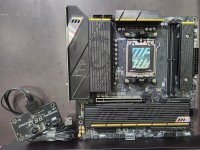
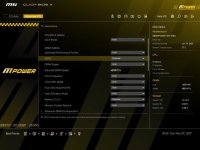
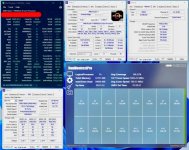
Zuletzt bearbeitet:

HardyEbw
Experte
- Mitglied seit
- 17.01.2025
- Beiträge
- 1.446
- Desktop System
- Gaming-PC
- Laptop
- ASUS Zenbook S16 (AMD Ryzen AI 9 HX 370)
- Details zu meinem Desktop
- Prozessor
- AMD Ryzen 9 9950X3D2, Optimus Signature V3
- Mainboard
- ASRock X870E Taichi OCF
- Kühler
- MORA 400 + Signature V3 CPU & CORE 1 GPU
- Speicher
- 32GB G.Skill F5-6000J2636H16GX2, ICE Block
- Grafikprozessor
- Gigabyte RTX 5090 Windforce OC, CORE 1 Block
- Display
- ASUS ROG Strix OLED XG32UCWMG 4K@240Hz
- SSD
- Kingston 1TB Gen5 & 2+2+4TB Gen4 NVME
- Gehäuse
- be quiet! LIGHT BASE 500
- Netzteil
- FSP MEGA TI 1650W 80 Plus Titanium
- Keyboard
- ASUS ROG Azoth
- Mouse
- ASUS ROG Harpe II Ace
- Betriebssystem
- MS Windows 11 Pro
- Webbrowser
- MS Edge
- Sonstiges
- Thermal Grizzly WireView Pro II
- Internet
- ▼250 MBit ▲40 MBit
Ich habe 1,5mm für die Rückseite und 1,0mm für die Vorderseite mit Chips/ICs verwendet.
Bei den iceman?Ich habe 1,5mm für die Rückseite und 1,0mm für die Vorderseite mit Chips/ICs verwendet.
Pmic auch 1mm?
Danke schonmal 😁
HardyEbw
Experte
- Mitglied seit
- 17.01.2025
- Beiträge
- 1.446
- Desktop System
- Gaming-PC
- Laptop
- ASUS Zenbook S16 (AMD Ryzen AI 9 HX 370)
- Details zu meinem Desktop
- Prozessor
- AMD Ryzen 9 9950X3D2, Optimus Signature V3
- Mainboard
- ASRock X870E Taichi OCF
- Kühler
- MORA 400 + Signature V3 CPU & CORE 1 GPU
- Speicher
- 32GB G.Skill F5-6000J2636H16GX2, ICE Block
- Grafikprozessor
- Gigabyte RTX 5090 Windforce OC, CORE 1 Block
- Display
- ASUS ROG Strix OLED XG32UCWMG 4K@240Hz
- SSD
- Kingston 1TB Gen5 & 2+2+4TB Gen4 NVME
- Gehäuse
- be quiet! LIGHT BASE 500
- Netzteil
- FSP MEGA TI 1650W 80 Plus Titanium
- Keyboard
- ASUS ROG Azoth
- Mouse
- ASUS ROG Harpe II Ace
- Betriebssystem
- MS Windows 11 Pro
- Webbrowser
- MS Edge
- Sonstiges
- Thermal Grizzly WireView Pro II
- Internet
- ▼250 MBit ▲40 MBit
Ja
und ja.
🙃
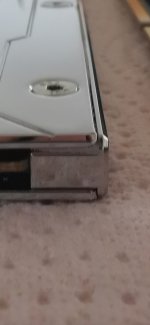
P.S.: Keine Ahnung, was Pmic sind. Habe lediglich 1,5mm hinten und 1,0mm vorne verwendet. Temps scheinen zu passen. Ob an einer Stelle 0,5mm nochmals besser wären, keine Ahnung.
Vielleicht hilft das Foto noch etwas. Weitere hatte ich leider nicht gemacht.

und ja.
🙃
P.S.: Keine Ahnung, was Pmic sind. Habe lediglich 1,5mm hinten und 1,0mm vorne verwendet. Temps scheinen zu passen. Ob an einer Stelle 0,5mm nochmals besser wären, keine Ahnung.
Vielleicht hilft das Foto noch etwas. Weitere hatte ich leider nicht gemacht.
Zuletzt bearbeitet:

RedF
Urgestein
- Mitglied seit
- 07.03.2020
- Beiträge
- 5.987
- Ort
- am Main
- Desktop System
- Rechner
- Laptop
- Laptop
- Details zu meinem Desktop
- Prozessor
- Ryzen 9800X3D
- Mainboard
- ASrock X870E Taichi OCF
- Kühler
- Core 1 360+1080 Radiator
- Speicher
- 32GB 8000MT/S
- Grafikprozessor
- 9707XT
- Display
- Samsung Odyssey OLED G8
- SSD
- 960GB Corsair MP510, 512GB Samsung PM961, 2TB FireCuda, 4TB Lexar
- Opt. Laufwerk
- -
- Soundkarte
- Schiit HEL2
- Gehäuse
- Corsair 7000D
- Netzteil
- Superflower Leadex 16000
- Keyboard
- Wooting Two He
- Mouse
- Xtrfy MZ1
- Betriebssystem
- W11
- Webbrowser
- Firefox
- Sonstiges
- 3D-Drucker: Qidi Plus 4, Ender 3V2 (war er mal)
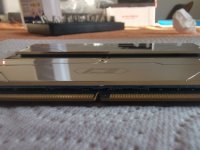
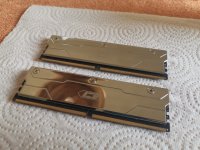
Nimm doch einfach Putty.Weiß jemand zufällig die pad dicken für iceman full Kupfer kühler?
Single sided dimms
Dachte:
1.5mm Rückseite
1mm Pmic
0.5mm memory ic's
Hab ich tatsächlich so bei meinem b-die gemacht.Nimm doch einfach Putty.
Hab noch upsiren hier 😁
Anhänge
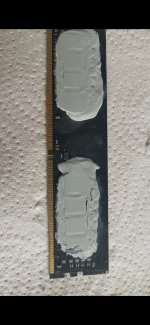
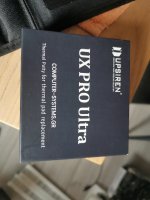
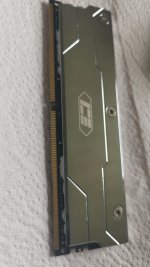
Ok Pad/putty hybrid ist fertig 😂
6000 c26 1.4v A-dies
1.5mm back
0.5mm memory ic's
0.5mm Pmic
Putty zwischen die schraublöcher statt WLP
6000 c26 1.4v A-dies
1.5mm back
0.5mm memory ic's
0.5mm Pmic
Putty zwischen die schraublöcher statt WLP
Anhänge
Zuletzt bearbeitet:
HardyEbw
Experte
- Mitglied seit
- 17.01.2025
- Beiträge
- 1.446
- Desktop System
- Gaming-PC
- Laptop
- ASUS Zenbook S16 (AMD Ryzen AI 9 HX 370)
- Details zu meinem Desktop
- Prozessor
- AMD Ryzen 9 9950X3D2, Optimus Signature V3
- Mainboard
- ASRock X870E Taichi OCF
- Kühler
- MORA 400 + Signature V3 CPU & CORE 1 GPU
- Speicher
- 32GB G.Skill F5-6000J2636H16GX2, ICE Block
- Grafikprozessor
- Gigabyte RTX 5090 Windforce OC, CORE 1 Block
- Display
- ASUS ROG Strix OLED XG32UCWMG 4K@240Hz
- SSD
- Kingston 1TB Gen5 & 2+2+4TB Gen4 NVME
- Gehäuse
- be quiet! LIGHT BASE 500
- Netzteil
- FSP MEGA TI 1650W 80 Plus Titanium
- Keyboard
- ASUS ROG Azoth
- Mouse
- ASUS ROG Harpe II Ace
- Betriebssystem
- MS Windows 11 Pro
- Webbrowser
- MS Edge
- Sonstiges
- Thermal Grizzly WireView Pro II
- Internet
- ▼250 MBit ▲40 MBit
Lasse uns dann gern einmal deine Temps unter Last wissen.
Meine liegen bei TM5 oder Karhu um 34 Grad, bei 27 Grad Raumtemperatur auch mal bis 35,8 Grad SPD. Höher hab ich noch nicht gesehen.
Meine liegen bei TM5 oder Karhu um 34 Grad, bei 27 Grad Raumtemperatur auch mal bis 35,8 Grad SPD. Höher hab ich noch nicht gesehen.

medifix
Experte
- Mitglied seit
- 23.10.2016
- Beiträge
- 296
- Details zu meinem Desktop
- Prozessor
- AMD Ryzen 5 8400F
- Mainboard
- ASRock B850M Pro-A
- Kühler
- Enermax ETS-T50 @1x140
- Speicher
- DDR5 32GB
- Grafikprozessor
- AMD Radeon RX 9070 @2x140
- Display
- 2560x1440 (WQHD) 60 Hz
- SSD
- 500GB NVMe, 1TB SATA
- Gehäuse
- JONSBO C6 Max
- Netzteil
- Sharkoon Rebel P20 ATX 750W
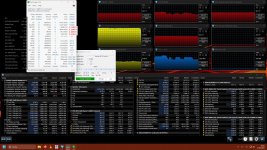
Hab noch nen iceman Block bestellt, wird also noch ne Woche dauern.Lasse uns dann gern einmal deine Temps unter Last wissen.
Meine liegen bei TM5 oder Karhu um 34 Grad, bei 27 Grad Raumtemperatur auch mal bis 35,8 Grad SPD. Höher hab ich noch nicht gesehen.
Mach ich dann.

CrazyCookie
Enthusiast
- Mitglied seit
- 24.03.2012
- Beiträge
- 994
- Desktop System
- Black Box
- Details zu meinem Desktop
- Prozessor
- Ryzen 7 8700G
- Mainboard
- Asrock B850i Lightning Wifi
- Kühler
- Noctua NH-D15
- Speicher
- G.Skill Ripjaws S5 2x24GB, DDR5-6400, CL32-39-39-102
- Grafikprozessor
- iGPU
- Display
- Benq BL3200PT
- SSD
- 4TB WD SN850X
- Gehäuse
- Fractal Define R4
- Netzteil
- Enermax Platimax 500W
- Keyboard
- Logitech G710+
- Mouse
- Logitech MX518
- Betriebssystem
- Manjaro KDE Edition
- Sonstiges
- ASRock Deskmini X600+Ryzen 5 8500G
das sind nicht zufällig H16M? denke hab irgendwann mal gehört dass die gute tRFC2 schaffen und da deine CPU nur tRFC2/sb nutzt könnte das eine Erklärung sein. Obwohl deine tRP eigentlich nicht nach H16M aussieht ...meine niedrigste trfc die 90min testmem5-stabil durchlief.
Zuletzt bearbeitet:
medifix
Experte
- Mitglied seit
- 23.10.2016
- Beiträge
- 296
- Details zu meinem Desktop
- Prozessor
- AMD Ryzen 5 8400F
- Mainboard
- ASRock B850M Pro-A
- Kühler
- Enermax ETS-T50 @1x140
- Speicher
- DDR5 32GB
- Grafikprozessor
- AMD Radeon RX 9070 @2x140
- Display
- 2560x1440 (WQHD) 60 Hz
- SSD
- 500GB NVMe, 1TB SATA
- Gehäuse
- JONSBO C6 Max
- Netzteil
- Sharkoon Rebel P20 ATX 750W
@CrazyCookie
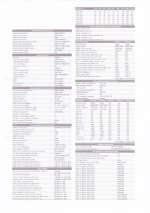
das sind 2 stück doppelseitige patriot riegel mit je 8 chips pro seite.
wenn du aus dem anhang schlau wirst...:
das sind 2 stück doppelseitige patriot riegel mit je 8 chips pro seite.
wenn du aus dem anhang schlau wirst...:
Anhänge
Ryzen 8000 benutzt kein tRFC, sondern nur tRFC2/sb@CrazyCookie
das sind 2 stück doppelseitige patriot riegel mit je 8 chips pro seite.
wenn du aus dem anhang schlau wirst...:
Ok, muss hier was korrigieren.
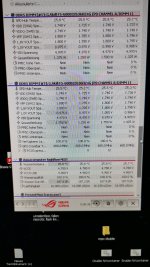
Hatte vor paar tagen gesagt, der supercool bremst den Durchfluss und mein setting ist Nichtmehr stable.
Hab mir jetzt nen high flow next zum testen geholt.
Mit beiden d5 auf 100% hab ich fast 300L Durchfluss.
Hier im Screenshot läuft eine d5 100% und eine d5 20%.
Trotzdem 190L.
Hatte mit unter 100 gerechnet.
Der supercool ist doch nicht restriktiv und darf drin bleiben.
1c delta Wasser zu Sticks.
Dann muss ich jetzt schauen wieso mein 8400 C34 Nichtmehr läuft.
War wohl einfach zu heiß im Büro.
Dann landet der iceman im Marktplatz.
Hatte vor paar tagen gesagt, der supercool bremst den Durchfluss und mein setting ist Nichtmehr stable.
Hab mir jetzt nen high flow next zum testen geholt.
Mit beiden d5 auf 100% hab ich fast 300L Durchfluss.
Hier im Screenshot läuft eine d5 100% und eine d5 20%.
Trotzdem 190L.
Hatte mit unter 100 gerechnet.
Der supercool ist doch nicht restriktiv und darf drin bleiben.
1c delta Wasser zu Sticks.
Dann muss ich jetzt schauen wieso mein 8400 C34 Nichtmehr läuft.
War wohl einfach zu heiß im Büro.
Dann landet der iceman im Marktplatz.
Anhänge
Zuletzt bearbeitet:
CompuChecker
Urgestein
- Mitglied seit
- 10.08.2007
- Beiträge
- 5.836
- Desktop System
- Battlefield 6 Suchti
- Laptop
- MacBook Pro 16 M4 Pro 48GB
- Details zu meinem Desktop
- Prozessor
- AMD 9800X3D -25CO
- Mainboard
- Asrock X870 Raptide
- Kühler
- BeQuiet Dark Rock Elite + 4x 140 Noctua A14 G2
- Speicher
- 64 GB Corsair 6000Mhz CL28 optimiert
- Grafikprozessor
- MSI 5090 Suprim SOC
- Display
- LG 34 Zoll 1440P Gysync 180Hz
- SSD
- 2 TB WD8100, 2 TB Samsung 980 Pro
- Gehäuse
- Corsair Frame 5000d
- Netzteil
- Bequiet Straight Power 12 1000W
- Keyboard
- Logitech G915 Lightspeed
- Mouse
- Logitech Lightweight Pro 2
- Betriebssystem
- Windows 11
- Webbrowser
- Firefox
- Sonstiges
- Synology DS920+ NAS 72 TB
- Internet
- ▼670 Mbit ▲350 Mbit
Welche Nitro Settings stellt Ihr bei 6000er Cl28 ein?
1-2-0 oder 1-2-1 je nach CPUWelche Nitro Settings stellt Ihr bei 6000er Cl28 ein?
CompuChecker
Urgestein
- Mitglied seit
- 10.08.2007
- Beiträge
- 5.836
- Desktop System
- Battlefield 6 Suchti
- Laptop
- MacBook Pro 16 M4 Pro 48GB
- Details zu meinem Desktop
- Prozessor
- AMD 9800X3D -25CO
- Mainboard
- Asrock X870 Raptide
- Kühler
- BeQuiet Dark Rock Elite + 4x 140 Noctua A14 G2
- Speicher
- 64 GB Corsair 6000Mhz CL28 optimiert
- Grafikprozessor
- MSI 5090 Suprim SOC
- Display
- LG 34 Zoll 1440P Gysync 180Hz
- SSD
- 2 TB WD8100, 2 TB Samsung 980 Pro
- Gehäuse
- Corsair Frame 5000d
- Netzteil
- Bequiet Straight Power 12 1000W
- Keyboard
- Logitech G915 Lightspeed
- Mouse
- Logitech Lightweight Pro 2
- Betriebssystem
- Windows 11
- Webbrowser
- Firefox
- Sonstiges
- Synology DS920+ NAS 72 TB
- Internet
- ▼670 Mbit ▲350 Mbit
Welches Setting ist das stabilere?


* Safe/Starting Point: 1 / 3 / 1
* Optimal: 1 / 2 / 1
* Extreme: 1 / 2 / 0
* Optimal: 1 / 2 / 1
* Extreme: 1 / 2 / 0
Ähnliche Themen
- Antworten
- 24
- Aufrufe
- 3K


- Antworten
- 29
- Aufrufe
- 3K

[User-Review]
Lesertest: ADATA XPG LANCER NEON RGB DDR5-8000
- Antworten
- 0
- Aufrufe
- 854

- Antworten
- 37
- Aufrufe
- 6K