[Sammelthread] AMD K8/K9 - Sockel 939 | 940 | 754

Dürfte das noch machbare Ende mit CL 2.5/CR2 auf dem K8T800 PRO sein. @digitalbath 's Custom RAM überfordert meine Boards :fresse:
Meine boards auch. Ich habe diese Riegel auf meinem MSI - 939 - NF3 board getestet. Da gingen 295Mhz / CL2,5. Mit CL3 bin ich kein MHz weiter gekommen. Das wollte das board nicht. Ich hatte da sogar verschiedene CPUs getestet. Ich werde noch andere 939 boards mit CL3 testen.
Top Ergebnis!! Schade dass man wegen dem Chipsatz CR 2T fahren muss. Das ist meiner Meinung nach aber nicht schlimm.
 
Wenn Du diese Anzeige nicht sehen willst, registriere Dich und/oder logge Dich ein.
Es ging mir ja mehr darum, dass >300-MHz RAM mit dem VIA machbar sind und das sogar recht schnell. Keine Chance gegen den nF3/nF4 aber schon bissl stolz auf das Brett (y)
Abit AV8 306 1T.png


Die anderen K8T800 Boards in 32M:


Um UDMA6 mit einem Adapter zu erhalten, habe ich jetzt PIN 34 und PIN 30 vom IDE-Anschluss mit einem kleinen Kabel auf dem Adapter verbunden -> funzt!
https://superuser.com/questions/957715/ide-pata-wire-order bzw. https://www.vogons.org/viewtopic.php?t=101337
 
Zuletzt bearbeitet:
Die Brücke wäre auch mein Vorschlag gewesen. Die Adapter können 100mb/s, aber teils ist der Pin für die Erkennung als 80pin "Kabel" nicht korrekt verlötet. Macht man das geht plötzlich UDMA5 oder 6.

Davon ab top Ergebnis. 2.5-3-3 bei 300Mhz, selbst als 2T ist fürn ollen VIA Chipsatz echt verdammt gut.
 
Timings leicht verbessert und Screen vom SSD-Bench:

Abit AV8 307 3-4-3-8 1T.png

E: ist noch immer UDMA4. 6 wäre theoretisch 133MB/s
Ich brauche glaub so nen 3-GHz Venice :asthanos:
 
Zuletzt bearbeitet:
Mein DFI NF3 hat 315MHz CL2.5 gestemmt (y) Liegt also nicht nur am Chipsatz. Da machte dann auch der Ram zu. Mit CL3 gingen so um die 325 (auf NF4 max. 330).

1772174156378.png


Edit: Ich seh gerade, das war Single Channel, aber ich hatte Dual auch schon 310 am laufen. 🤔 Mit 300 CL2.5 lief die Möhre ja als Gaming-Setup monatelang stabil.
 
E: ist noch immer UDMA4. 6 wäre theoretisch 133MB/s
Busmaster nicht aktiv oder kein Support und/oder sauschlechte PCI Performance.
Kann auch Windows sein! Ich hatte mal nen Vergleich bei den PCI-SATA adaptern gemacht und jedes noch so olle 32bit Live-Linux war flotter als ein WinXP, was die Transferleistung angeht.
Muss also nicht mal die Hardware sein, ggf auch der schlechte Win Treiber

Timings leicht verbessert und Screen vom SSD-Bench:
schau mal, ob du an nen schönen SiL 3512 / 3112/3114 Controller kommst.

@Tzk hatte da fleißig Firmware Updates gehortet und mit den Teilen kommst du eigentlich immer an die 100MB/s ran
 
Zuletzt bearbeitet:
Danke dafür, aber man sollte vielleicht auch die Hyperion 5.24 Treiber installieren lol

100MB/s sind jetzt möglich...

Wir schlagen dann aber demnächst das Kapitel mit 300-MHz FSB/RAM und 3D-Benches bei VIA auf... soweit nicht wirklich gut :rolleyes2: eher so mittel. Stabilität usw.
 
Zuletzt bearbeitet:
There is more to it here, see it's pictures. But indeed, it could be my bench board.

Anhang anzeigen 1180802

Anhang anzeigen 1180804

Anhang anzeigen 1180805

Anhang anzeigen 1180806

So I cleaned the board and partially recapped it. I will probably recap the rest as well. I hope pcie 1 is working now.

For the record: I don't give a thing about colors for caps on my bench boards. I just need the best caps.

20260408_194945.jpg


Edit 10-04-2026: It is fully recapped now.
 
Zuletzt bearbeitet:
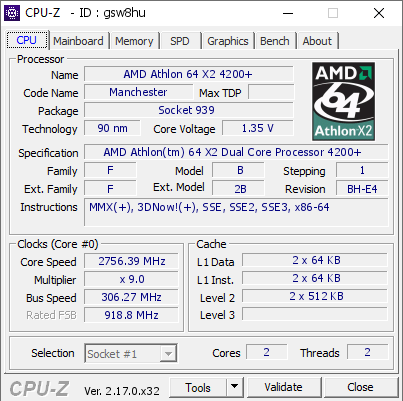
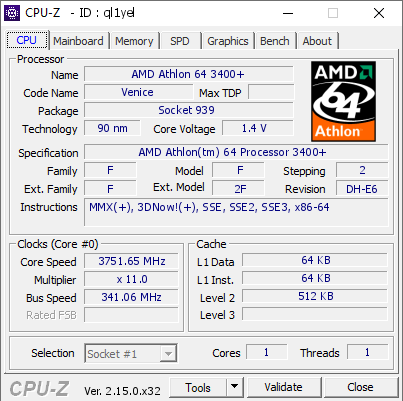
So this came unexpected... My Opteron 152 was not that good (I did not even bother to validate it). Then came my 3400+...
My 3400+ (s939) runs "great" on cold (see my comment on hwbot about boot and validating it).
I can boot and validate it at 3751.65MHz (1.92v). It a monster CPU that can run -95C to -100C and be benched. Potential: 3.8+.


Now that is a gap...
1780761961872.png
 
So this came unexpected... My Opteron 152 was not that good (I did not even bother to validate it). Then came my 3400+...
My 3400+ (s939) runs "great" on cold (see my comment on hwbot about boot and validating it).
I can boot and validate it at 3751.65MHz (1.92v). It a monster CPU that can run -95C to -100C and be benched. Potential: 3.8+.


Now that is a gap...
Anhang anzeigen 1210173
CPU like this is a lottery win. I'm sure there's still some headroom left. Have you managed to find out where the CB kicks in?
 
Well there was… https://valid.x86.fr/z2ind0

Up to -100C there is no real coldbug. It keeps scaling, it is just that max fsb lowers on cold.
So best benching temp is -80C to -85C. When given a light load it might validate fine at -90C to -95C. So that could bring me to 3.8 or close.
 
Interessanter Artikel zur Geschichte vom Athlon 64 von Antinomy

 
Bei mir türmen sich mittlerweile die kleineren 939-Prozessoren. Da würd ich gern aussortieren. Kann mir wer bitte eine grobe Einschätzung geben, welcher zu behalten lohnt und welcher weg kann?

ADA3000DEP4AW
AW = CG Newcastle
-LBAZC 0510GPMW Z617*

ADA3000DIK4BI
BI = D0 Winchester
-CBBID 0504GPCW 1200*
-CBBID 0504DPAW 1227*
-LBBID 0509DPGW Z612*
-LBBID 0511GPMW Z504*
-CBBID 0512GPMW Z626*

ADA3000DAA4BP
BP = E3 Venice
-LBBLE 0521BPKW Z711*

ADA3000DAA4BW
BW = E6 Venice
-LBBWE 0533DPKW Z741*
-LBBWE 0533EPBW Z743*
-LBBWE 0534APAW Z746* -> Darf bleiben, schafft memtest86 mit 9x300 bei 1,35V
-LBBWE 0535FPEW Z300*
-BNNWE 0537BPHW Z505*
-LBBWE 0538DPIW Z750206I50274
-LBBWE 0538DPIW Z750206I50887
-LBBWE 0539APCW Z814*
-LBBWE 0544FPCW Z841*
-LBBWE 0544FPFW Z841*
-NBBWE 0609DPDW Z904*
-LBBWE 0616BAB X028*

-----

ADA3200DEP4AW
AW = CG Newcastle
-CBAEC 0426RPMW 1015*

ADA3200DIK4BI
BI = D0 Winchester
-CBBID 0502GPMW 1186*
-CBBID 0508APCW 1218*

ADA3200DAA4BP
BP = E3 Venice
-LBBLE 0521CPGW Z711*
-LBBLE 0537GPMW Z810*
-LBBLE 0543WPMW Z836*

ADA3200DAA4BW
BW = E6 Venice
-LBBWE 0529DPAW Q381*
-LBBWE 0537DPBW Z806*
-LBBWE 0542CPGW Z829*
-LBBWE 0545APCW Z842*
-LBBWE 0550FPMW Z866*
-LBBWE 0551APEW Z867*
-LBBWE 0551DPGW Z868637L50028
-LBBWE 0551DPGW Z868637L50735
-NBBWE 0601CPMW Z876427A60925
-ZBBWE 0601CPMW Z876297A61088
-NBBWE 0606APBW Z887*
-NBBWE 0606VPCW Z889*
-CAB1E 0612EPMW 1440* -> Darf bleiben, schafft memtest86 mit 10x300 bei 1,3V
-NBBWE 0612SPMW Z918167C62230
-NBBWE 0612SPMW Z918167C60656
-NBBWE 0612WPAW Z920*
-NBBWE 0618EAD X100*
-NBBWE 0618CAF X100*

ADA3200DKA4CG
CG = E4 Manchester
-CDBHE 0539VPMW 1341*

-----

ADA3400DEP4AZ
AZ = CG Newcastle
-CBAEC 0430WPMW 1014*
-LBAZC 0451BPMW Z567*

ADA3400DAA4BY
BY = E6 Venice
-LBBWE 0542CPFW Z750*
-LBBWE 0545GPSW Z846*
-LBBWE 0551BPTW Z868*
-NBBWE 0616GAE X029*

-----

ADA3500DIK4BI
BI = D0 Winchester
-CBBID 0501FPAW 1126*
-CBBID 0502FPBW 1186*

ADA3500DAA4BP
BP = E3 Venice
-LBBLE 0522GPMW Z716*

ADA3500DAA4BW
BW = E6 Venice
-LBBWE 0533APBW Z741*
-LBBWE 0533FPIW Z743*
-LBBWE 0535GPNW Z802*
-LBBWE 0544BPBW Z837*
-LBBWE 0601CPEW Z876*
-NBBWE 0606FPMW Z890*
-CACAE 0611GPDW 1438*
-LBBWE 0611DAI X024*
-LEBBE 0626CAC X105*
-LEBBE 0627AAC X105*
-NBBWE 0632FPMW Z976*
-LEBCE 0633EAH X113*
-LEBBE 0635AAH X113*
-LEBBE 0635BAD X113*

-----

ADA3800DEP4AW
AW = CG Newcastle
-CBAEC 0427WPMW 1034*

ADA3800DAA4BW
BW = E6 Venice
-CAB1E 0620VPMW 1467*
-NBBWE 0622DAD X102*
-NBBWE 0622EAA X102*
-LEBBE 0634UPAW Z986*
-LBBWE 0638CAA X117*
-CAB1E 0639BPMW 1540* -> Darf bleiben, schafft memtest86 mit 10x300 bei 1,45V
 
Bei mir türmen sich mittlerweile die kleineren 939-Prozessoren. Da würd ich gern aussortieren. Kann mir wer bitte eine grobe Einschätzung geben, welcher zu behalten lohnt und welcher weg kann?

ADA3000DEP4AW
AW = CG Newcastle
-LBAZC 0510GPMW Z617*

ADA3000DIK4BI
BI = D0 Winchester
-CBBID 0504GPCW 1200*
-CBBID 0504DPAW 1227*
-LBBID 0509DPGW Z612*
-LBBID 0511GPMW Z504*
-CBBID 0512GPMW Z626*

ADA3000DAA4BP
BP = E3 Venice
-LBBLE 0521BPKW Z711*

ADA3000DAA4BW
BW = E6 Venice
-LBBWE 0533DPKW Z741*
-LBBWE 0533EPBW Z743*
-LBBWE 0534APAW Z746* -> Darf bleiben, schafft memtest86 mit 9x300 bei 1,35V
-LBBWE 0535FPEW Z300*
-BNNWE 0537BPHW Z505*
-LBBWE 0538DPIW Z750206I50274
-LBBWE 0538DPIW Z750206I50887
-LBBWE 0539APCW Z814*
-LBBWE 0544FPCW Z841*
-LBBWE 0544FPFW Z841*
-NBBWE 0609DPDW Z904*
-LBBWE 0616BAB X028*

-----

ADA3200DEP4AW
AW = CG Newcastle
-CBAEC 0426RPMW 1015*

ADA3200DIK4BI
BI = D0 Winchester
-CBBID 0502GPMW 1186*
-CBBID 0508APCW 1218*

ADA3200DAA4BP
BP = E3 Venice
-LBBLE 0521CPGW Z711*
-LBBLE 0537GPMW Z810*
-LBBLE 0543WPMW Z836*

ADA3200DAA4BW
BW = E6 Venice
-LBBWE 0529DPAW Q381*
-LBBWE 0537DPBW Z806*
-LBBWE 0542CPGW Z829*
-LBBWE 0545APCW Z842*
-LBBWE 0550FPMW Z866*
-LBBWE 0551APEW Z867*
-LBBWE 0551DPGW Z868637L50028
-LBBWE 0551DPGW Z868637L50735
-NBBWE 0601CPMW Z876427A60925
-ZBBWE 0601CPMW Z876297A61088
-NBBWE 0606APBW Z887*
-NBBWE 0606VPCW Z889*
-CAB1E 0612EPMW 1440* -> Darf bleiben, schafft memtest86 mit 10x300 bei 1,3V
-NBBWE 0612SPMW Z918167C62230
-NBBWE 0612SPMW Z918167C60656
-NBBWE 0612WPAW Z920*
-NBBWE 0618EAD X100*
-NBBWE 0618CAF X100*

ADA3200DKA4CG
CG = E4 Manchester
-CDBHE 0539VPMW 1341*

-----

ADA3400DEP4AZ
AZ = CG Newcastle
-CBAEC 0430WPMW 1014*
-LBAZC 0451BPMW Z567*

ADA3400DAA4BY
BY = E6 Venice
-LBBWE 0542CPFW Z750*
-LBBWE 0545GPSW Z846*
-LBBWE 0551BPTW Z868*
-NBBWE 0616GAE X029*

-----

ADA3500DIK4BI
BI = D0 Winchester
-CBBID 0501FPAW 1126*
-CBBID 0502FPBW 1186*

ADA3500DAA4BP
BP = E3 Venice
-LBBLE 0522GPMW Z716*

ADA3500DAA4BW
BW = E6 Venice
-LBBWE 0533APBW Z741*
-LBBWE 0533FPIW Z743*
-LBBWE 0535GPNW Z802*
-LBBWE 0544BPBW Z837*
-LBBWE 0601CPEW Z876*
-NBBWE 0606FPMW Z890*
-CACAE 0611GPDW 1438*
-LBBWE 0611DAI X024*
-LEBBE 0626CAC X105*
-LEBBE 0627AAC X105*
-NBBWE 0632FPMW Z976*
-LEBCE 0633EAH X113*
-LEBBE 0635AAH X113*
-LEBBE 0635BAD X113*

-----

ADA3800DEP4AW
AW = CG Newcastle
-CBAEC 0427WPMW 1034*

ADA3800DAA4BW
BW = E6 Venice
-CAB1E 0620VPMW 1467*
-NBBWE 0622DAD X102*
-NBBWE 0622EAA X102*
-LEBBE 0634UPAW Z986*
-LBBWE 0638CAA X117*
-CAB1E 0639BPMW 1540* -> Darf bleiben, schafft memtest86 mit 10x300 bei 1,45V


CG - 2005 or later 2004 seems Ok so far.

BI - not as good on air as Venice. Might do Ok on cold but nothing special is expected.

BL - good for cold. No 3GHz on air is expected.

BW (Venice) - 2005 models are less good then 2006 models for air cooling. Should all do Ok on cold but 2006 is prefered.
2006 BW are among the best cold OC if they can do 2.9-3GHz on air (boot).

B1 - Great air clockers. Limited headroom on cold but could be top 3 if they run Ok.

CBAEC 0426RPMW 1015 - nothing special is expected

BH manchester - expexting less good on air but could scale on cold.

Venice with BB - not good on air or cold.
Venice with BC - Not sure but not much is expected.Could be San Diego with half of the cache. Then it can be good.
 
Zuletzt bearbeitet:
I decided to try and make a tool that can show A64 OC speed for memory and CPU. It is not perfect but it looks like it works.
Please tell me what you think or find.

Edit 01-08-2026 20:56: Changed it to v1.1
Edit 01-08-2026 22:02: Working on v1.2
 

Anhänge

  • Athlon 64 mem snelheden per CPU multi - rev 1.2.zip
    16,2 KB · Aufrufe: 19
Zuletzt bearbeitet:
For me it looks a bit strange to make a drop down menu for FSB (which can be anything) and make a type in for memory frequency (which has a very limited number of hardwired options). And I'm not sure the half-multis are right, have you checked? I remember there was a bug. Also, doesn't A64 info have this option?
And I don't see a point to add HTT speed, it has nothing to do with memory and CPU clock generally speaking. Just my opinion. Why not make a table with CPU multi * Mem clock = True mem divider?
 
Valid points.
About the drop down. I did not check all memory MHz settings, that is why I left it open. Not sure if I keep the drop down. I thought it was nice at first but it seems as more work to set an FSB amount.
Since I use it to have an idea for OC I added HT as well. But it could just as well be a separate thing.
The true memory divider is in there?
 
When looking for the A64 dividers one will inevitably stumble upon a post by Oskar Wu on XS Forums. He actually used an oscilloscope to probe the real dividers and made a table off it. Pasting it here so you don't have to go through wayback machine:


In general it seems that AMD assumed a divider and calculated the real ram clock off it by rounding. Ram clock on A64 is derived from cpu clock anyways, so different cpu multiplier will inevitably change the applied ram divider and thus the resulting ram clocks. AMD would've been better off to just state the real ram divider in the bios... (like /11) Their "guess" of /200 /183 etc is just annoying.

I'd assume that AMD tries to match the desired ram speed as close as possible, but will always select a divider which doesn't exceed the desired frequency. So if the resulting clock of a divider ist just a tiny bit above the expected value, the cpu will always select a bigger divider and thus lower the real clock below the threshhold. So if for example a /14 divider will result in 135Mhz DDR (at 200Mhz HT!) , but a 133 divider was selected, then the cpu will use /15 instead and underclock the ram. This happens for example at cpu multi 9.5x with /143 (real: 135Mhz) and /133 (real: 126Mhz) and /125 (real: 118Mhz).

"real" dividers by Oskar Wu:

1785818893614.png


"real" clocks based on the dividers from above also by Oskar Wu:

1785819635103.png
 
Zuletzt bearbeitet:
This and addition of revision E dividers and checking Semprons and mobiles would fulfill and end this question.
 
My last post didn't survive the outage. So I'll try to post it again as close as possible.

I remember that you can calculate the memory clock yourself with the following three steps:

1. multiply 200 with the current cpu multiplier set in bios
2. divide the result by the memory clock set in bios -> round up the number if it isn't .0
3. divide the current cpu clock by the result from 2.

In one of your exaples that means:

1. 200 * 9,5 = 1,900
2. 1,900 / 143 = 13.28x -> 14
3. 1,900 / 14 = 135,7 MHz (DDR-271)

For me it worked really well and helped a lot while overclocking back then. Lets assume the following settings: 300 MHz reference clock, cpu multiplier 9.5 and memory clock 183.

1. 200 * 9.5 = 1,900
2. 1,900 / 183 = 10.38x -> 11
3. 2,850 (300 * 9.5) / 11 = 259 MHz (DDR-518)

That would have been a decent BH5-overclack back then. :)
 
In general it seems that AMD assumed a divider and calculated the real ram clock off it by rounding. Ram clock on A64 is derived from cpu clock anyways, so different cpu multiplier will inevitably change the applied ram divider and thus the resulting ram clocks. AMD would've been better off to just state the real ram divider in the bios... (like /11) Their "guess" of /200 /183 etc is just annoying.

I'd assume that AMD tries to match the desired ram speed as close as possible, but will always select a divider which doesn't exceed the desired frequency. So if the resulting clock of a divider ist just a tiny bit above the expected value, the cpu will always select a bigger divider and thus lower the real clock below the threshhold. So if for example a /14 divider will result in 135Mhz DDR (at 200Mhz HT!) , but a 133 divider was selected, then the cpu will use /15 instead and underclock the ram. This happens for example at cpu multi 9.5x with /143 (real: 135Mhz) and /133 (real: 126Mhz) and /125 (real: 118Mhz).
Well, in fact AMD's "guess" on the memory clocks is not a guess, it is absolutely perfect. The flaw is in the way it is presented to the user. Years ago I stumbled upon the same issue when overclocking my (rest in peace) trusty 4400+ with 8 gigs of RAM.

I noticed, that there is some very simple logic behind the memory dividers and that you can calculate Oskar Wu's table completely in Excel. Did this now within 5 minutes ;-)
The deal is to know the "real" memory dividers, which are in fact "rational numbers", a fraction of two natural numbers, where the second number, the divisor, is always 3. Yeah, I know, I'm getting a bit mathematical in here.
Anyways, the true mem dividers are as follows:

Mem Divider shown in BiosBase Number of FractionReal Mem divider (Base / 3)
100300100
125375125
133400133,333333333333333333333333333333333...
143430143,333333333333333333333333333333333...
150450150
166500166,666666666666666666666666666666666...
183550183,333333333333333333333333333333333...
200600200
216650216,66666666666666666666666666666666.....
233700233,333333333333333333333333333333333....
250750250


So if you want to know the real memory clock when using the 133 divider, use 400/3 instead for an absolutely matching solution.
The odd thing is the 143 divider, which is a bit off with a base of 430. Maybe this is a historical residue out of SD-RAM times. I've never seen this divider with a revision E6 CPU.
The last three dividers don't seem to work, although present in the latest BIOS of my A8N32-SLI deluxe. Those are always interpreted as a 200 mem divider, no upclocking is possible.

As file attachement there is my Excel 2016 spreadsheet with all formulas and dividers, replicating the Oskar Wu mem divider table.

Thanks for reading :-)

[Edit]
There are some other limitations to consider.
Minimum dividers: as Oskar Wu noted, the minimum mem divider is 5, not 4.
Since some revision ( I think E4?) the minimum CPU divider is also 5, not 4. You may be able to set it via RMclock in windows, but the system will hang or crash.

 

Anhänge

  • Athlon64 Memory Dividers by CPU Clock.zip
    11,6 KB · Aufrufe: 10
Zuletzt bearbeitet:
firegl01.png


firegl03.PNG


Eigentlich nur wegen der FireGL X3, aber ich denke, dass wir für die Karte einen eigenen neuen Thread erstellen sollten...
 
Hardwareluxx setzt keine externen Werbe- und Tracking-Cookies ein. Auf unserer Webseite finden Sie nur noch Cookies nach berechtigtem Interesse (Art. 6 Abs. 1 Satz 1 lit. f DSGVO) oder eigene funktionelle Cookies. Durch die Nutzung unserer Webseite erklären Sie sich damit einverstanden, dass wir diese Cookies setzen. Mehr Informationen und Möglichkeiten zur Einstellung unserer Cookies finden Sie in unserer Datenschutzerklärung.


Zurück
Oben Unten refresh