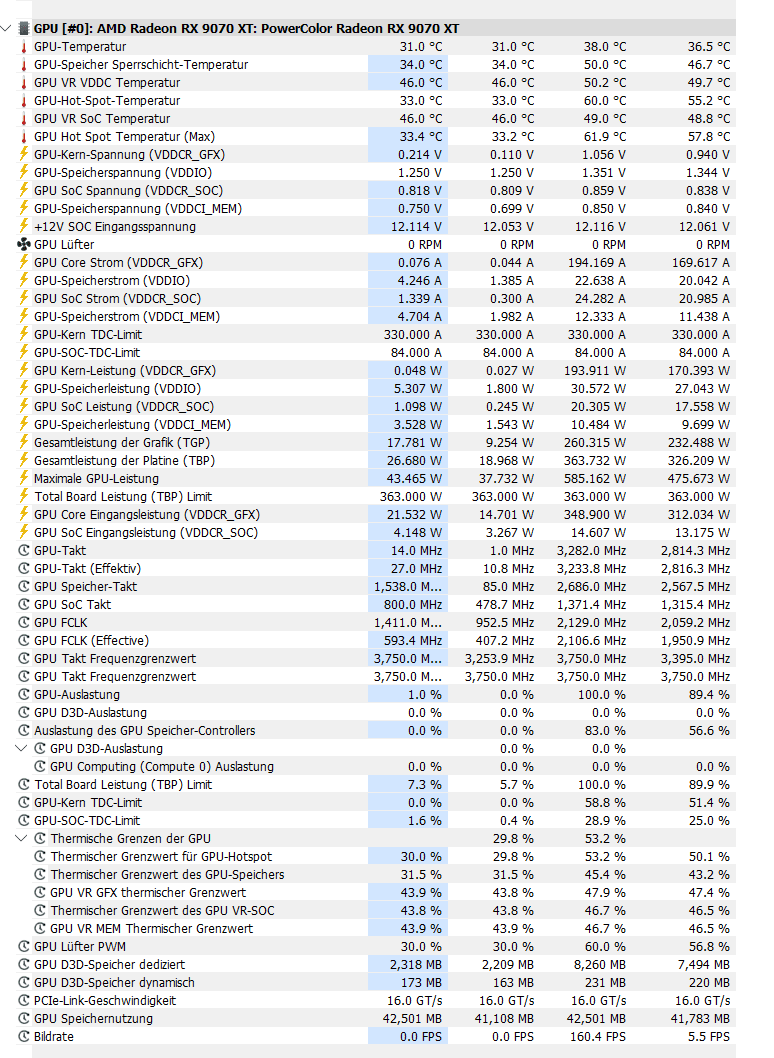
#!/bin/bash
#Disclaimer: I release this tool for research and academic purposes
#If you use this tool and your GPU fails, do not claim warranty
#You use this tool at your own risk, I am not responsible for any damage
#Main script
#Global constants
#VR addresses
vr1="0x22"
vr2="0x24"
#VR pages
page0="0x00"
page1="0x01"
page2="0x02"
#VR registers
cg1_register="0x08"
cg1_alt_register="0x0c"
pg_register="0x0f"
vid_register="0x23"
trim_register="0x22"
droop_gain_register="0x06"
backup1_register="0x4b"
backup2_register="0x4d"
min_vid_offset_gfx="-50"
max_vid_offset_gfx="250"
min_vid_offset_vram="-100"
max_vid_offset_vram="135"
min_vid_offset_soc="-50"
max_vid_offset_soc="100"
min_vid_offset_vddci="-50"
max_vid_offset_vddci="100"
min_trim_offset_gfx="-50"
max_trim_offset_gfx="50"
min_droop="26"
max_droop="255"
# Global variables
bus_number=""
gpu_type=""
TDC_multiplier="1.20"
TBP_multiplier="1.20"
TDC_alt_multiplier="1.20"
gfx_vid_offset=""
soc_vid_offset=""
vram_vid_offset=""
vddci_vid_offset=""
gfx_trim_offset=""
vr1_tbp_scale=""
vr2_tbp_scale=""
vr1_tdc_scale=""
vr1_tdc_alt_scale=""
stock_vr1_cg1=""
stock_vr1_cg1_alt=""
stock_vr1_pg=""
current_vr1_pg=""
current_vr1_cg1=""
current_vr1_cg1_alt=""
# Function to detect the operating system
detect_os() {
if [[ "$OSTYPE" == "linux-gnu"* ]]; then
echo "Detected Linux OS"
else
echo -e "\033[1;31mUnsupported OS: $OSTYPE. Exiting.\033[0m"
exit 1
fi
}
# Function to check if i2c_dev module is loaded and load it if necessary
check_i2c_module() {
if ! lsmod | grep -q i2c_dev; then
sudo modprobe i2c_dev
echo "Loaded i2c_dev module"
else
echo "i2c_dev module already loaded"
fi
}
# Function to install i2c-tools and bc based on the detected OS
install_i2c_tools() {
if command -v apt-get &> /dev/null; then
# Debian-based system (e.g., Ubuntu)
if ! dpkg-query -W -f='${Status}' i2c-tools 2>/dev/null | grep -q "ok installed"; then
sudo apt-get update
sudo apt-get install -y i2c-tools bc
echo "Installed i2c-tools and bc"
elif ! dpkg-query -W -f='${Status}' bc 2>/dev/null | grep -q "ok installed"; then
sudo apt-get install -y bc
echo "Installed bc"
else
echo "i2c-tools and bc are already installed."
fi
elif command -v pacman &> /dev/null; then
# Arch Linux
if ! pacman -Q i2c-tools &> /dev/null; then
sudo pacman -Sy --noconfirm i2c-tools bc
echo "Installed i2c-tools and bc"
elif ! pacman -Q bc &> /dev/null; then
sudo pacman -S --noconfirm bc
echo "Installed bc"
else
echo "i2c-tools and bc are already installed."
fi
elif command -v yum &> /dev/null || command -v dnf &> /dev/null; then
# YUM-based system (e.g., CentOS, RHEL)
package_manager="yum"
if command -v dnf &> /dev/null; then
package_manager="dnf"
fi
if ! rpm -q i2c-tools &> /dev/null; then
sudo $package_manager install -y i2c-tools bc
echo "Installed i2c-tools and bc"
elif ! rpm -q bc &> /dev/null; then
sudo $package_manager install -y bc
echo "Installed bc"
else
echo "i2c-tools and bc are already installed."
fi
else
echo -e "\033[1;31mUnsupported package manager. Please install i2c-tools and bc manually.\033[0m"
exit 1
fi
}
find_i2c_bus() {
# Get matching i2c lines (SMU 0 or bcm)
mapfile -t matches < <(i2cdetect -l | grep -E "SMU 0|bcm")
if [ ${#matches[@]} -eq 0 ]; then
echo -e "\033[1;31mNo i2c bus with \"SMU 0\" or \"bcm\" found.\033[0m"
exit 1
fi
# If only one match, select it automatically
if [ ${#matches[@]} -eq 1 ]; then
selected_line="${matches[0]}"
else
echo "Multiple matching i2c buses found:"
echo
# Show numbered menu
for i in "${!matches[@]}"; do
bus=$(echo "${matches[$i]}" | awk '{print $1}')
desc=$(echo "${matches[$i]}" | cut -f3)
printf " [%d] %s (%s)\n" "$((i+1))" "$bus" "$desc"
done
echo
while true; do
read -rp "Select the i2c bus to use [1-${#matches[@]}]: " choice
if [[ "$choice" =~ ^[0-9]+$ ]] && (( choice >= 1 && choice <= ${#matches[@]} )); then
selected_line="${matches[$((choice-1))]}"
break
fi
echo "Invalid selection, try again."
done
fi
# Extract bus number
bus_number=$(echo "$selected_line" | awk '{print $1}' | cut -d '-' -f 2)
# Determine why it matched
if echo "$selected_line" | grep -q "SMU 0"; then
I2C_BACKEND="SMU 0"
else
I2C_BACKEND="bcm"
fi
export I2C_BACKEND
echo "Using i2c bus: i2c-$bus_number ($I2C_BACKEND)"
}
gpu_check() {
local first_byte second_byte check_value
# Helper function to read two bytes from a VR device
read_vr_bytes() {
local vr="$1"
local check_value
# Set and verify page 0 using robust path
if ! i2c_set_page "$bus_number" "$vr" "$page0"; then
echo -e "\033[1;31mError: Failed to set page 0x00 on VR device $vr.\033[0m"
exit 1
fi
# Read register 0x9A (word)
if ! check_value=$(i2c_read_register "$vr" "$page0" 0x9a w); then
echo -e "\033[1;31mError: Failed to read register 0x9A from VR device $vr.\033[0m"
exit 1
fi
# Normalize value
check_value="${check_value#0x}"
if [[ ${#check_value} -eq 4 ]]; then
first_byte="${check_value:2:2}"
second_byte="${check_value:0:2}"
else
echo -e "\033[1;31mError: Unexpected data format from VR device $vr: 0x$check_value\033[0m"
exit 1
fi
}
# --- Step 1: Detect GPU type on first VR device (vr1) ---
read_vr_bytes "$vr1"
if [ "$first_byte" == "57" ] || [ "$second_byte" == "57" ]; then
echo "Detected RDNA3 GPU, this script doesn't support RDNA3"
exit 1
elif [ "$first_byte" == "68" ] || [ "$second_byte" == "68" ]; then
echo "Detected RDNA4 GPU on first VR device ($vr1)"
else
echo -e "\033[1;31mUnsupported GPU type detected on $vr1. Found bytes: $first_byte, $second_byte.\033[0m"
exit 1
fi
# --- Step 2: Validate RDNA4 GPU on both VR devices ---
for vr in "$vr1" "$vr2"; do
read_vr_bytes "$vr"
if [ "$first_byte" != "68" ] && [ "$second_byte" != "68" ]; then
echo -e "\033[1;31mError: The byte at VR device $vr for RDNA4 should be 68. Found bytes: $first_byte, $second_byte.\033[0m"
exit 1
fi
done
echo -e "\033[1;36m[✓ ]\033[0m $rdna4_power_case GPU validated successfully!\n"
}
read_stock_values() {
local val
# --- VR1 PG (11 bits) ---
val=$(i2c_read_register "$vr1" "$page2" "$pg_register" wp) || return 1
VR1_PG=$(( val & 0x7FF ))
# --- VR1 CG1 (11 bits) ---
val=$(i2c_read_register "$vr1" "$page2" "$cg1_register" wp) || return 1
VR1_CG1=$(( val & 0x7FF ))
# --- VR2 PG (11 bits) ---
val=$(i2c_read_register "$vr2" "$page2" "$pg_register" wp) || return 1
VR2_PG=$(( val & 0x7FF ))
# --- VR1 CG1_alt (7 bits) ---
val=$(i2c_read_register "$vr1" "$page2" "$cg1_alt_register" wp) || return 1
VR1_CG1_ALT=$(( val >> 4 & 0x7F ))
return 0
}
build_backup_block() {
local packed=0
local flag=1 # valid backup
packed=$(( (packed << 1) | flag ))
packed=$(( (packed << 11) | VR1_PG ))
packed=$(( (packed << 11) | VR1_CG1 ))
packed=$(( (packed << 11) | VR2_PG ))
packed=$(( (packed << 7) | VR1_CG1_ALT ))
echo "$packed"
}
split_blocks() {
local final=$1
BLOCK1=$(( (final >> 21) & 0x1FFFFF )) # 21 bits → VR1
BLOCK2=$(( final & 0x1FFFFF )) # 21 bits → VR2
}
write_vr_block() {
local vr=$1
local block=$2
local full16=$(( (block >> 5) & 0xFFFF ))
local p1_bits=$(( block & 0x1F ))
# ---- Write page1 0x4D (16 bits) ----
if ! i2c_write_register "$vr" "$page1" "$backup2_register" \
"$(printf "0x%04X" $full16)" wp; then
return 1
fi
# ---- Modify page1 0x4B[15:11] ----
local reg
reg=$(i2c_read_register "$vr" "$page1" "$backup1_register" wp) || {
return 1
}
reg=$(( reg & ~(0x1F << 11) ))
reg=$(( reg | (p1_bits << 11) ))
if ! i2c_write_register "$vr" "$page1" "$backup1_register" \
"$(printf "0x%04X" $reg)" wp; then
return 1
fi
return 0
}
backup_stock_data() {
echo -e "\033[H\033[J"
read_stock_values || {
echo -e "\033[1;31m[✗ ]\033[0m Failed reading stock registers"
return 1
}
local final
final=$(build_backup_block)
split_blocks "$final"
write_vr_block "$vr1" "$BLOCK1" || return 1
write_vr_block "$vr2" "$BLOCK2" || return 1
echo -e "\033[1;36m[✓ ]\033[0m Stock data backup stored successfully."
}
ensure_backup_present() {
echo "Checking for existing backup..."
if read_stock_scale_values >/dev/null 2>&1; then
echo "Backup detected — skipping creation."
else
echo "No valid backup found — creating backup..."
backup_stock_data || {
echo "ERROR: Failed to create backup."
exit 1
}
echo "Backup created successfully."
fi
}
read_vr_block() {
local vr=$1
local full16
full16=$(i2c_read_register "$vr" "$page1" "$backup2_register" wp) || return 1
full16=$((full16))
local reg
reg=$(i2c_read_register "$vr" "$page1" "$backup1_register" wp) || return 1
local p1_bits=$(( (reg >> 11) & 0x1F ))
echo $(( (full16 << 5) | p1_bits ))
}
I2C_DELAY=0.1
I2C_RETRIES=5
i2c_do() {
local cmd="$1"
shift
local attempt out
for ((attempt=1; attempt<=I2C_RETRIES; attempt++)); do
if [[ "$cmd" == "set" ]]; then
if i2cset -y "$@" >/dev/null 2>&1; then
sleep "$I2C_DELAY"
return 0
fi
else
if out=$(i2cget -y "$@" 2>/dev/null); then
echo "$out"
return 0
fi
fi
sleep "$I2C_DELAY"
done
return 1
}
i2c_write_verify() {
local bus="$1"
local addr="$2"
local reg="$3"
local val="$4"
local width="$5"
local attempt rb
val="${val#0x}"
for ((attempt=1; attempt<=I2C_RETRIES; attempt++)); do
i2c_do set "$bus" "$addr" "$reg" "0x$val" "$width" || continue
rb=$(i2c_do get "$bus" "$addr" "$reg" "$width") || continue
rb="${rb#0x}"
# Normalize both to integers
val_int=$((16#$val))
rb_int=$((16#${rb#0x}))
if (( rb_int == val_int )); then
return 0
fi
done
return 1
}
i2c_set_page() {
local bus="$1"
local addr="$2"
local page="$3"
i2c_write_verify "$bus" "$addr" 0x00 "$page" b
}
i2c_write_register() {
local addr="$1"
local page="$2"
local reg="$3"
local val="$4"
local width="${5:-w}"
i2c_set_page "$bus_number" "$addr" "$page" || return 1
i2c_write_verify "$bus_number" "$addr" "$reg" "$val" "$width" || return 1
i2c_set_page "$bus_number" "$addr" 0x00 || return 1
}
i2c_read_register() {
local addr="$1"
local page="$2"
local reg="$3"
local val
local width="${4:-w}"
i2c_set_page "$bus_number" "$addr" "$page" || return 1
val=$(i2c_do get "$bus_number" "$addr" "$reg" "$width") || return 1
i2c_set_page "$bus_number" "$addr" 0x00 || return 1
echo "$val"
}
# Function to convert VID values to and from 16-bit hex with two's complement handling
convert_vid_value() {
local direction=$1
local input_value=$2
if [ "$direction" == "to_hex" ]; then
# Convert mV to the appropriate value (divide by 5)
local converted_value=$(( input_value / 5 ))
local twos_complement
# Calculate two's complement and format as 16-bit hex
if (( converted_value < 0 )); then
twos_complement=$(( (converted_value & 0xFF) + 256 ))
else
twos_complement=$(( converted_value & 0xFF ))
fi
# Format the result as a 16-bit hex with 0x prefix and zero-padding
printf "0x%04X\n" "$twos_complement"
elif [ "$direction" == "from_hex" ]; then
local vid_hex_value=$input_value
# Remove the '0x' prefix if present
vid_hex_value=${vid_hex_value#0x}
# Convert the hex value to decimal
local decimal_value=$(( 16#$vid_hex_value ))
# If the number is less than 256, directly multiply by 5
if (( decimal_value < 256 )); then
local final_value=$(( decimal_value * 5 ))
else
# Otherwise, subtract 512 before multiplying by 5
local final_value=$(( (decimal_value - 512) * 5 ))
fi
# Format the output with a + sign for positive values
if (( final_value >= 0 )); then
printf "+%d\n" "$final_value"
else
echo "$final_value"
fi
else
echo "Invalid direction. Use 'to_hex' or 'from_hex'."
fi
}
# Function to convert TRIM values to and from 16-bit hex with 7-bit two's complement
# TRIM step = 0.8 mV
# Register = 7-bit signed (-64 .. +63)
convert_trim_value() {
local direction=$1
local input_value=$2
local BIT_WIDTH=7
local MAX_VAL=$((1 << BIT_WIDTH)) # 128
local SIGN_BIT=$((1 << (BIT_WIDTH-1))) # 64
local MASK=$((MAX_VAL - 1)) # 0x7F
if [ "$direction" == "to_hex" ]; then
# Convert mV → integer steps (round to nearest)
# steps = round(mV / 0.8)
input_value=${input_value#+}
local steps
steps=$(printf "%.0f" "$(echo "$input_value / 0.8" | bc -l)")
# Clamp to valid range
if (( steps > 63 )); then steps=63; fi
if (( steps < -64 )); then steps=-64; fi
# Encode two's complement
local encoded
if (( steps < 0 )); then
encoded=$(( (MAX_VAL + steps) & MASK ))
else
encoded=$(( steps & MASK ))
fi
printf "0x%04X\n" "$encoded"
elif [ "$direction" == "from_hex" ]; then
local trim_hex_value=${input_value#0x}
local raw=$(( 16#$trim_hex_value & MASK ))
local steps
if (( raw >= SIGN_BIT )); then
steps=$(( raw - MAX_VAL ))
else
steps=$raw
fi
local mv
mv=$(printf "%.1f" "$(echo "$steps * 0.8" | bc -l)")
if (( steps >= 0 )); then
printf "+%s\n" "$mv"
else
printf "%s\n" "$mv"
fi
else
echo "Invalid direction. Use 'to_hex' or 'from_hex'."
fi
}
# Function to modify current gain offset value
convert_cg() {
local value=$1
local multiplier=$2
# Divide the value by multiplier
local adjusted_value=$(echo "scale=2; $value / $multiplier" | bc)
adjusted_value=${adjusted_value%.*} # Remove the decimal part
# Check if adjusted_value is greater than 2047
if (( $(echo "$adjusted_value > 2047" | bc) )); then
adjusted_value=2047
fi
# Mask out the original bits 0-10 and insert the shifted value back
local resulting_value=$((vr1_tdc_scale & ~0x7FF | adjusted_value))
# Convert the resulting value back to hex (padded to 4 digits)
local hex_result=$(printf "%04x" "$resulting_value")
echo "0x$hex_result"
}
convert_cg_alt() {
local value=$1
local multiplier=$2
# Divide the value by multiplier
local adjusted_value=$(echo "scale=2; $value / $multiplier" | bc)
adjusted_value=${adjusted_value%.*} # Remove the decimal part
# Check if adjusted_value is greater than 127
if (( $(echo "$adjusted_value > 127" | bc) )); then
adjusted_value=127
fi
# Mask out the original bits [15:11]-[3:0] and insert the shifted value back
local resulting_value=$((vr1_tdc_alt_scale & ~0x7F0 | (adjusted_value << 4)))
# Convert the resulting value back to hex (padded to 4 digits)
local hex_result=$(printf "%04x" "$resulting_value")
echo "0x$hex_result"
}
# Function to modify current gain offset value
convert_pg() {
local value=$1
local vr=$2
local multiplier=$3
# Divide the value by multiplier
local adjusted_value=$(echo "scale=2; $value / $multiplier" | bc)
adjusted_value=${adjusted_value%.*} # Remove the decimal part
# Check if adjusted_value is greater than 2047
if (( $(echo "$adjusted_value > 2047" | bc) )); then
adjusted_value=2047
fi
if [[ "$vr" == "$vr1" ]]; then
# Mask out the original bits 0-10 and insert the shifted value back
local resulting_value=$((vr1_tbp_scale & ~0x7FF | adjusted_value))
elif [[ "$vr" == "$vr2" ]]; then
local resulting_value=$((vr2_tbp_scale & ~0x7FF | adjusted_value))
else
echo "Invalid VR number"
fi
# Convert the resulting value back to hex (padded to 4 digits)
local hex_result=$(printf "%04x" "$resulting_value")
echo "0x$hex_result"
}
# Function to modify droop value
convert_droop() {
local direction=$1
local input_value=$2
if [ "$direction" == "to_hex" ]; then
# Remove '0x' prefix if present
gfx_droop=${gfx_droop#0x}
# Convert existing hex to decimal
local existing_decimal=$((16#$gfx_droop))
# Extract upper 8 bits (preserve them)
local upper_8_bits=$(( (existing_decimal >> 8) & 0xFF ))
# Convert input to decimal and mask to 8 bits (value of interest)
local lower_8_bits=$(( (input_value ) & 0xFF ))
# Combine upper and lower parts into full 16-bit value
local new_value=$(( (upper_8_bits << 8) | lower_8_bits ))
# Format as 16-bit hex with 0x prefix
printf "0x%04X\n" "$new_value"
elif [ "$direction" == "from_hex" ]; then
local vid_hex_value=$input_value
# Remove '0x' prefix if present
vid_hex_value=${vid_hex_value#0x}
# Convert the hex value to decimal
local decimal_value=$((16#$vid_hex_value))
# Extract bits [7:0] (lower 8 bits)
local lower_8_bits=$(( decimal_value & 0xFF ))
echo "$lower_8_bits"
else
echo "Invalid direction. Use 'to_hex' or 'from_hex'."
fi
}
# Checks VID offset is within predefined limits
validate_vid_offset() {
local value="$1"
local min_limit="$2"
local max_limit="$3"
# Check if the input is valid (must start with + or - and followed by digits)
if [[ $value =~ ^[+-][0-9]+$ ]]; then
# Extract the numerical part
num_part=${value:1}
# Check if multiple of 5
if (( num_part % 5 == 0 )); then
# Convert to integer for range check
value_int=$((value))
# Check if value is within valid range
if [ $value_int -ge $min_limit ] && [ $value_int -le $max_limit ]; then
return 0 # Valid
fi
fi
fi
return 1 # Invalid
}
# Checks TDC scalar is within predefined limits
validate_tdc_scalar() {
local value="$1"
# Check if the input is valid (must be a number with up to two decimal places)
if [[ $value =~ ^[0-9]+(\.[0-9]{1,2})?$ ]]; then
# Convert input to a float for comparison
num_part=$(LC_NUMERIC=C printf "%.2f" "$value")
# Check if the number is within the range [0.10, 2.00]
if (( $(echo "$num_part >= 0.10" | bc -l) )) && (( $(echo "$num_part <= 2.00" | bc -l) )); then
return 0 # Valid
fi
fi
return 1 # Invalid
}
# Checks TBP scalar is within predefined limits
validate_tbp_scalar() {
local value="$1"
# Check if the input is valid (must be a number with up to two decimal places)
if [[ $value =~ ^[0-9]+(\.[0-9]{1,2})?$ ]]; then
# Convert input to a float for comparison
num_part=$(LC_NUMERIC=C printf "%.2f" "$value")
# Check if the number is within the range [0.10, 3.00]
if (( $(echo "$num_part >= 0.10" | bc -l) )) && (( $(echo "$num_part <= 3.00" | bc -l) )); then
return 0 # Valid
fi
fi
return 1 # Invalid
}
# Get user input for VID offset values
get_vid_input() {
local var_name=$1
local min_vid_limit=$2
local max_vid_limit=$3
while true; do
echo -e "\nValues must be between $min_vid_limit mV and +$max_vid_limit mV, and multiples of 5."
read -p "Input $var_name offset in mV with +/- in front: " input_value
# Check if the input is valid (must start with + or - and followed by digits)
if [[ $input_value =~ ^[+-][0-9]+$ ]]; then
# Extract the numerical part
num_part=${input_value:1}
# Check if multiple of 5
if (( num_part % 5 == 0 )); then
# Check if value is within valid range
if [ $input_value -ge $min_vid_limit ] && [ $input_value -le $max_vid_limit ]; then
declare -g "$var_name=$input_value"
break
else
echo "VID offset must be between $min_vid_limit mV and +$max_vid_limit mV"
fi
else
echo "Not a multiple of 5. Please enter a valid value."
fi
else
echo "Invalid input. Please enter a value preceded by + or - and followed by digits."
fi
done
}
# Get user input for droop value
get_droop_input() {
local var_name=$1
local min_droop=$2
local max_droop=$3
while true; do
echo -e "\nValues must be between $min_droop and $max_droop (integers only)."
read -p "Input IDROOP value: " input_value
# Check if the input is a valid positive integer
if [[ $input_value =~ ^[0-9]+$ ]]; then
# Check if value is within valid range
if [ $input_value -ge $min_droop ] && [ $input_value -le $max_droop ]; then
declare -g "$var_name=$input_value"
break
else
echo "Droop offset must be between $min_droop and $max_droop"
fi
else
echo "Invalid input. Please enter a valid positive integer."
fi
done
}
# Get user input for TRIM offset values (auto-round to nearest 0.8mV step)
get_trim_input() {
local var_name=$1
local min_limit=$2
local max_limit=$3
local STEP_NUM=4 # 0.8mV = 4/5
local STEP_DEN=5
while true; do
echo -e "\nValues must be between $min_limit mV and +$max_limit mV."
echo "Resolution is 0.8 mV — your value will be rounded to nearest step."
read -p "Input $var_name offset in mV with +/- in front: " input_value
if [[ $input_value =~ ^[+-][0-9]+$ ]]; then
local mv=$input_value
# Range check BEFORE rounding (user expectation)
if (( mv < min_limit || mv > max_limit )); then
echo "TRIM offset must be between $min_limit mV and +$max_limit mV"
continue
fi
# Convert mV → steps with symmetric rounding
local steps
if (( mv >= 0 )); then
steps=$(( (mv * STEP_DEN + 2) / STEP_NUM ))
else
steps=$(( (mv * STEP_DEN - 2) / STEP_NUM ))
fi
# Convert back to actual applied mV
local actual_mv
actual_mv=$(printf "%.1f" "$(echo "$steps * 0.8" | bc -l)")
if (( steps >= 0 )); then
declare -g "$var_name=+$actual_mv"
else
declare -g "$var_name=$actual_mv"
fi
echo "Rounded to nearest supported value: ${actual_mv} mV"
break
else
echo "Invalid input. Please enter + or - followed by digits."
fi
done
}
# Get user input for TDC multiplier value
get_tdc_scalar_input() {
local var_name=$1
local input_value
while true; do
echo -e "\nValues must be between 0.10 and 2.00 with up to two decimal places, go back to the menu with 0."
read -p "Input $var_name value: " input_value
# Check if the input is 0 to go back to the main menu
if [ "$input_value" == "0" ]; then
echo "Going back to the main menu."
return 1 # Return a non-zero status to indicate going back
fi
# Check if the input is valid (must be a number with up to two decimal places)
if [[ $input_value =~ ^[0-9]+(\.[0-9]{1,2})?$ ]]; then
# Convert input to a float for comparison
num_part=$(LC_NUMERIC=C printf "%.2f" "$input_value")
# Check if the number is within the range [1.00, 2.00]
if (( $(echo "$num_part >= 0.10" | bc -l) )) && (( $(echo "$num_part <= 2.00" | bc -l) )); then
echo "Valid input: $num_part"
break
else
echo "Value out of range. Please enter a value between 0.10 and 2.00."
fi
else
echo "Invalid input. Please enter a number with up to two decimal places or 0 to go back."
fi
done
# Store the validated input value in a variable that can be accessed later
eval "$var_name=$num_part"
return 0 # Return a zero status to indicate successful input
}
# Get user input for TDC multiplier value
get_tdc_alt_scalar_input() {
local var_name=$1
local input_value
while true; do
echo -e "\nValues must be between 0.10 and 2.00 with up to two decimal places, go back to the menu with 0."
read -p "Input $var_name value: " input_value
# Check if the input is 0 to go back to the main menu
if [ "$input_value" == "0" ]; then
echo "Going back to the main menu."
return 1 # Return a non-zero status to indicate going back
fi
# Check if the input is valid (must be a number with up to two decimal places)
if [[ $input_value =~ ^[0-9]+(\.[0-9]{1,2})?$ ]]; then
# Convert input to a float for comparison
num_part=$(LC_NUMERIC=C printf "%.2f" "$input_value")
# Check if the number is within the range [1.00, 2.00]
if (( $(echo "$num_part >= 1.00" | bc -l) )) && (( $(echo "$num_part <= 2.00" | bc -l) )); then
echo "Valid input: $num_part"
break
else
echo "Value out of range. Please enter a value between 0.10 and 2.00."
fi
else
echo "Invalid input. Please enter a number with up to two decimal places or 0 to go back."
fi
done
# Store the validated input value in a variable that can be accessed later
eval "$var_name=$num_part"
return 0 # Return a zero status to indicate successful input
}
# Get user input for TDC multiplier value
get_tbp_scalar_input() {
local var_name=$1
local input_value
while true; do
echo -e "\nValues must be between 0.10 and 3.00 with up to two decimal places, go back to the menu with 0."
read -p "Input $var_name value: " input_value
# Check if the input is 0 to go back to the main menu
if [ "$input_value" == "0" ]; then
echo "Going back to the main menu."
return 1 # Return a non-zero status to indicate going back
fi
# Check if the input is valid (must be a number with up to two decimal places)
if [[ $input_value =~ ^[0-9]+(\.[0-9]{1,2})?$ ]]; then
# Convert input to a float for comparison
num_part=$(LC_NUMERIC=C printf "%.2f" "$input_value")
# Check if the number is within the range [1.00, 3.00]
if (( $(echo "$num_part >= 0.10" | bc -l) )) && (( $(echo "$num_part <= 3.00" | bc -l) )); then
echo "Valid input: $num_part"
break
else
echo "Value out of range. Please enter a value between 0.10 and 3.00."
fi
else
echo "Invalid input. Please enter a number with up to two decimal places or 0 to go back."
fi
done
# Store the validated input value in a variable that can be accessed later
eval "$var_name=$num_part"
return 0 # Return a zero status to indicate successful input
}
# Function to apply and print the VID offsets with conversions based on GPU type
apply_vid() {
local gfx_offset=
local soc_offset=
local vram_offset=
local vddci_offset=
echo -e "Applying changes:\n"
if [ -n "$gfx_vid_offset" ]; then
echo -n "GFX_VID: $GFX_VID_mV mV -> "
gfx_offset=$(convert_vid_value "to_hex" "$GFX_VID_mV")
echo "$gfx_offset"
i2c_write_register "$vr1" "$page0" "$vid_register" "$gfx_offset" wp
# Refresh gfx_vid_offset after applying the change
gfx_vid_offset=$(i2c_read_register "$vr1" "$page0" "$vid_register" wp)
fi
if [ -n "$soc_vid_offset" ]; then
echo -n "SoC_VID: $SoC_VID_mV mV -> "
soc_offset=$(convert_vid_value "to_hex" "$SoC_VID_mV")
echo "$soc_offset"
i2c_write_register "$vr2" "$page0" "$vid_register" "$soc_offset" wp
# Refresh soc_vid_offset after applying the change
soc_vid_offset=$(i2c_read_register "$vr2" "$page0" "$vid_register" wp)
fi
if [ -n "$vram_vid_offset" ]; then
echo -n "VRAM_VID: $VRAM_VID_mV mV -> "
vram_offset=$(convert_vid_value "to_hex" "$VRAM_VID_mV")
echo "$vram_offset"
i2c_write_register "$vr2" "$page1" "$vid_register" "$vram_offset" wp
# Refresh vram_vid_offset after applying the change
vram_vid_offset=$(i2c_read_register "$vr2" "$page1" "$vid_register" wp)
fi
if [ -n "$vddci_vid_offset" ]; then
echo -n "VDDCI_VID: $VDDCI_VID_mV mV -> "
vddci_offset=$(convert_vid_value "to_hex" "$VDDCI_VID_mV")
echo "$vddci_offset"
i2c_write_register "$vr1" "$page1" "$vid_register" "$vddci_offset" wp
# Refresh vddci_vid_offset after applying the change
vddci_vid_offset=$(i2c_read_register "$vr1" "$page1" "$vid_register" wp)
fi
}
apply_trim() {
local gfx_offset=
echo -e "Applying TRIM changes:\n"
if [ -n "$GFX_TRIM_mV" ]; then
echo -n "GFX_TRIM: $GFX_TRIM_mV mV -> "
gfx_offset=$(convert_trim_value "to_hex" "$GFX_TRIM_mV")
echo "$gfx_offset"
i2c_write_register "$vr1" "$page0" "$trim_register" "$gfx_offset" wp
# Refresh after apply
gfx_trim_offset=$(i2c_read_register "$vr1" "$page0" "$trim_register" wp)
fi
}
# Function to scale TDC limit
scale_current_limit() {
local multiplier=$1
local vr1_cg1=$(convert_cg "$stock_vr1_cg1" "$multiplier")
i2c_write_register "$vr1" "$page2" "$cg1_register" "$vr1_cg1" wp
echo -e "\nTDC limit increased for RDNA4 GPU by\033[1;32m x$multiplier\033[0m\n"
}
scale_current_limit_alt() {
local multiplier=$1
local new_reg=$(convert_cg_alt "$stock_vr1_cg1_alt" "$multiplier")
i2c_write_register "$vr1" "$page2" "$cg1_alt_register" "$new_reg" wp
echo -e "\nTDC_alt limit increased by\033[1;32m x$multiplier\033[0m\n"
}
# Function to scale TBP limit
scale_power_limit() {
local multiplier=$1
local vr1_pg=$(convert_pg "$stock_vr1_pg" "$vr1" "$multiplier")
i2c_write_register "$vr1" "$page2" "$pg_register" "$vr1_pg" wp
local vr2_pg=$(convert_pg "$stock_vr2_pg" "$vr2" "$multiplier")
i2c_write_register "$vr2" "$page2" "$pg_register" "$vr2_pg" wp
echo -e "TBP limit increased for RDNA4 GPU by\033[1;32m x$multiplier\033[0m\n"
}
# Function to change droop
change_droop() {
local droop=$1
local droop_hex=$(convert_droop "to_hex" "$droop")
i2c_write_register "$vr1" "$page2" "$droop_gain_register" "$droop_hex" wp
echo -e "\nIDROOP changed to \033[1;32m$droop\033[0m\n"
}
#Populates existing VID offset values
populate_initial_offsets() {
read_vid_offsets
read_trim_offset
read_tbp_tdc_scale_values
read_stock_scale_values
read_droop
}
read_vid_offsets() {
gfx_vid_offset=$(i2c_read_register "$vr1" "$page0" "$vid_register" wp)
GFX_VID_mV=$(convert_vid_value "from_hex" "$gfx_vid_offset")
soc_vid_offset=$(i2c_read_register "$vr2" "$page0" "$vid_register" wp)
SoC_VID_mV=$(convert_vid_value "from_hex" "$soc_vid_offset")
vram_vid_offset=$(i2c_read_register "$vr2" "$page1" "$vid_register" wp)
VRAM_VID_mV=$(convert_vid_value "from_hex" "$vram_vid_offset")
vddci_vid_offset=$(i2c_read_register "$vr1" "$page1" "$vid_register" wp)
VDDCI_VID_mV=$(convert_vid_value "from_hex" "$vddci_vid_offset")
}
read_trim_offset() {
gfx_trim_offset=$(i2c_read_register "$vr1" "$page0" "$trim_register" wp)
GFX_TRIM_mV=$(convert_trim_value "from_hex" "$gfx_trim_offset")
}
read_tbp_tdc_scale_values() {
vr1_tbp_scale=$(i2c_read_register "$vr1" "$page2" "$pg_register" wp)
vr2_tbp_scale=$(i2c_read_register "$vr2" "$page2" "$pg_register" wp)
vr1_tdc_scale=$(i2c_read_register "$vr1" "$page2" "$cg1_register" wp)
vr1_tdc_alt_scale=$(i2c_read_register "$vr1" "$page2" "$cg1_alt_register" wp)
}
read_droop() {
gfx_droop=$(i2c_read_register "$vr1" "$page2" "$droop_gain_register" wp)
active_droop_gain=$(convert_droop "from_hex" "$gfx_droop")
droop_gain=$active_droop_gain
}
read_stock_scale_values() {
local block1 block2
block1=$(read_vr_block "$vr1") || return 1
block2=$(read_vr_block "$vr2") || return 1
local final=$(( (block1 << 21) | (block2 & 0x1FFFFF) ))
local data=$final
stock_vr1_cg1_alt=$(( data & 0x7F ))
data=$(( data >> 7 ))
stock_vr2_pg=$(( data & 0x7FF ))
data=$(( data >> 11 ))
stock_vr1_cg1=$(( data & 0x7FF ))
data=$(( data >> 11 ))
stock_vr1_pg=$(( data & 0x7FF ))
data=$(( data >> 11 ))
local flag=$(( data & 1 ))
if (( flag != 1 )); then
echo "No valid backup present."
return 1
fi
return 0
}
current_scale_values() {
current_vr1_pg=$(( vr1_tbp_scale & 0x07FF ))
current_vr1_cg1=$(( vr1_tdc_scale & 0x07FF ))
current_vr1_cg1_alt=$(( vr1_tdc_alt_scale >> 4 & 0x7F ))
if (( stock_vr1_pg == 0 || stock_vr1_cg1 == 0 )); then
echo "Invalid stock values (division by zero)"
return 1
fi
vr1_pg_multiplier=$(bc <<< "scale=4; $stock_vr1_pg / $current_vr1_pg")
vr1_cg1_multiplier=$(bc <<< "scale=4; $stock_vr1_cg1 / $current_vr1_cg1")
vr1_cg1_alt_multiplier=$(bc <<< "scale=4; $stock_vr1_cg1_alt / $current_vr1_cg1_alt")
vr1_pg_multiplier=$(printf "%.2f" "$vr1_pg_multiplier")
vr1_cg1_multiplier=$(printf "%.2f" "$vr1_cg1_multiplier")
vr1_cg1_alt_multiplier=$(printf "%.2f" "$vr1_cg1_alt_multiplier")
}
# Function to display the main menu
show_main_menu() {
echo -e " \033[1;31m==========================================================\033[0m"
echo -e " \033[1;33m!!! WARNING: This has the potential to brick your GPU! !!!\033[0m"
echo -e " \033[1;31m==========================================================\033[0m"
echo
echo -e "\033[3;90mEphemeral edition — mods go away on full shutdown.\033[0m"
echo -e
echo -e "\033[1;36m[1]\033[0m Modify TBP/TDC Limits"
echo -e "\033[1;36m[2]\033[0m Modify VID/TRIM Offsets"
echo -e "\033[1;36m[3]\033[0m Modify LLC"
echo
echo -e "\033[1;31m[0]\033[0m Exit"
echo -e "\033[1;33m[h]\033[0m Help"
}
# Function to display the current limits submenu
show_limits_menu() {
echo -e "\033[1;32m========== Power Limit ==========\033[0m"
echo
echo -e "\033[1;36m[1]\033[0m Scale TBP limit \033[1;33mx$TBP_multiplier\033[0m times; Active TBP limit \033[1;32mx$vr1_pg_multiplier\033[0m"
echo -e "\033[1;36m[2]\033[0m Input new TBP limit scaling factor"
echo
echo -e "\033[3;90mUse one or the other TDC scaling, not both at same time\033[0m"
echo -e "\033[1;32m========== Current Limit ==========\033[0m"
echo
echo -e "\033[1;36m[3]\033[0m Scale TDC limit \033[1;33mx$TDC_multiplier\033[0m times; Active TDC limit \033[1;32mx$vr1_cg1_multiplier\033[0m"
echo -e "\033[1;36m[4]\033[0m Input new TDC limit scaling factor"
echo -e
echo -e "\033[1;32m========== Alternate Current Limit ==========\033[0m"
echo
echo -e "\033[1;36m[5]\033[0m Scale TDC_alt limit \033[1;33mx$TDC_alt_multiplier\033[0m times; Active TDC_alt limit \033[1;32mx$vr1_cg1_alt_multiplier\033[0m"
echo -e "\033[1;36m[6]\033[0m Input new TDC_alt limit scaling factor"
echo
echo
echo -e "\033[1;31m[0]\033[0m Back to Main Menu"
echo -e "\033[1;33m[h]\033[0m Help"
}
# Function to display the load-line submenu
show_droop_menu() {
echo -e "\033[1;32m========== Load Line ==========\033[0m"
echo
echo -e "\033[3;90mUse values from $min_droop ($(echo "scale=2; ($min_droop * 100 / 255)" | bc | sed 's/\.00$//')%) to $max_droop ($(echo "scale=2; ($max_droop * 100 / 255)" | bc | sed 's/\.00$//')%)\033[0m"
echo
echo -e "\033[1;36m[1]\033[0m Change droop gain to \033[1;33m$droop_gain\033[0m (\033[1;33m$(echo "scale=3; ($droop_gain * 100 / 255)" | bc | awk '{printf "%.2f\n", $1}')\033[0m%); Active droop \033[1;32m$active_droop_gain\033[0m (\033[1;32m$(echo "scale=3; ($active_droop_gain * 100 / 255)" | bc | awk '{printf "%.2f\n", $1}')\033[0m%)"
echo -e "\033[1;36m[2]\033[0m Input new droop value"
echo
echo
echo -e "\033[1;31m[0]\033[0m Back to Main Menu"
echo -e "\033[1;33m[h]\033[0m Help"
}
# Function to display the VID modification menu with current values
show_vid_menu() {
# Initialize converted values as empty strings
local converted_GFX_VID=""
local converted_SoC_VID=""
local converted_VRAM_VID=""
local converted_VDDCI_VID=""
local converted_GFX_TRIM=""
# Convert GFX_VID from hex to decimal if it is not empty
if [ -n "$gfx_vid_offset" ]; then
converted_GFX_VID=$(convert_vid_value "from_hex" "$gfx_vid_offset")
fi
# Convert SoC_VID from hex to decimal if it is not empty
if [ -n "$soc_vid_offset" ]; then
converted_SoC_VID=$(convert_vid_value "from_hex" "$soc_vid_offset")
fi
# Convert VRAM_VID from hex to decimal if it is not empty
if [ -n "$vram_vid_offset" ]; then
converted_VRAM_VID=$(convert_vid_value "from_hex" "$vram_vid_offset")
fi
# Convert VDDCI_VID from hex to decimal if it is not empty
if [ -n "$vddci_vid_offset" ]; then
converted_VDDCI_VID=$(convert_vid_value "from_hex" "$vddci_vid_offset")
fi
# Convert GFX_TRIM from hex to decimal if it is not empty
if [ -n "$gfx_trim_offset" ]; then
converted_GFX_TRIM=$(convert_trim_value "from_hex" "$gfx_trim_offset")
fi
echo -e "\nPlease select an option:\n"
echo -e "\033[1;32m========== VID offsets ==========\033[0m\n"
echo -e "\033[1;36m[1]\033[0m GFX_VID${gfx_vid_offset:+: \033[1;32m$converted_GFX_VID mV\033[0m -> \033[1;33m$GFX_VID_mV mV}\033[0m"
echo -e "\033[1;36m[2]\033[0m SoC_VID${soc_vid_offset:+: \033[1;32m$converted_SoC_VID mV\033[0m -> \033[1;33m$SoC_VID_mV mV}\033[0m"
echo -e "\033[1;36m[3]\033[0m VRAM_VID${vram_vid_offset:+: \033[1;32m$converted_VRAM_VID mV\033[0m -> \033[1;33m$VRAM_VID_mV mV}\033[0m"
echo -e "\033[1;36m[4]\033[0m VDDCI_VID${vddci_vid_offset:+: \033[1;32m$converted_VDDCI_VID mV\033[0m -> \033[1;33m$VDDCI_VID_mV mV}\033[0m"
echo -e
echo -e
echo -e "\033[1;32m========== TRIM offset ==========\033[0m\n"
echo -e "\033[1;36m[5]\033[0m GFX_TRIM${gfx_trim_offset:+: \033[1;32m$converted_GFX_TRIM mV\033[0m -> \033[1;33m$GFX_TRIM_mV mV}\033[0m"
echo -e
echo -e "\n\033[1;35m[6]\033[0m Apply VID"
echo -e "\033[1;35m[7]\033[0m Apply TRIM\n"
echo -e "\033[1;34m[8]\033[0m Set all VID to \033[1;34m0mV\033[0m"
echo -e "\033[1;34m[9]\033[0m Set TRIM to \033[1;34m0mV\033[0m"
echo -e "\n\033[1;31m[0]\033[0m Back to Main Menu"
echo -e "\033[1;33m[h]\033[0m Help"
}
# Function to display the Power/Current menu help
show_limits_menu_help() {
echo -e "\033[1;32m========== Power/Current Limits Help ==========\033[0m"
echo
echo -e "Controls GPU power (TBP) and current (TDC) limits."
echo -e "Higher limits = more performance, heat, and risk."
echo
echo -e "\033[1;31mWARNING:\033[0m"
echo -e "- Excessive limits can damage your GPU."
echo -e "- Monitor temps and stability."
echo
echo -e "\033[1;34mTBP (Total Board Power):\033[0m"
echo -e "\033[1;33m[1] Apply TBP scaling preset\033[0m"
echo -e " Applies preset scaling (e.g. x1.20) to TBP."
echo -e "\033[1;33m[2] Set TBP scaling factor\033[0m"
echo -e " Changes preset (use [1] to apply)."
echo
echo -e "\033[1;36mNote:\033[0m Gaming OC: adjust TBP only (avoid TDC)."
echo -e " RDNA4 x1.20 examples:"
echo -e " 9070XT ~363W -> ~435W | 9070 270W -> ~323W | 9060XT 200W -> ~240W"
echo
echo -e "\033[1;34mTDC (Current Limit):\033[0m"
echo -e "\033[1;33m[3] Apply TDC scaling preset\033[0m"
echo -e " Applies scaling to main TDC limit."
echo -e "\033[1;33m[4] Set TDC scaling factor\033[0m"
echo -e " Changes preset (use [3] to apply)."
echo
echo -e "\033[1;34mAlt TDC (GFX Current):\033[0m"
echo -e "\033[1;33m[5] Apply alternate TDC preset\033[0m"
echo -e " Use if primary TDC does not work."
echo -e "\033[1;33m[6] Set alternate TDC factor\033[0m"
echo -e " Changes preset (use [5] to apply)."
echo
echo -e "\033[1;36mImportant:\033[0m"
echo -e "- Do NOT use both TDC methods together."
echo -e "- Most users only need TBP scaling."
echo
echo -e "\033[1;31m[0]\033[0m Back to Main Menu"
}
# Function to display the Power/Current menu help
show_limits_menu_help() {
echo -e "\033[1;32m========== Power/Current Limits Help ==========\033[0m"
echo
echo -e "This menu controls GPU power (TBP) and current (TDC) limits."
echo -e "Increasing these limits allows the GPU to draw more power,"
echo -e "which can improve performance at the cost of higher heat and risk."
echo
echo -e "\033[1;31mWARNING:\033[0m"
echo -e "- Increasing limits too much can damage your GPU."
echo -e "- Always monitor temperatures and stability."
echo
echo -e "\033[1;34mTBP (Total Board Power):\033[0m"
echo -e "\033[1;33m[1] Apply TBP scaling preset\033[0m"
echo -e " Applies the preset scaling factor (e.g. x1.20) to the TBP limit."
echo -e " \"Active TBP limit\" shows the currently applied scaling."
echo
echo -e "\033[1;33m[2] Set TBP scaling factor\033[0m"
echo -e " Changes the preset scaling factor."
echo -e " This does NOT apply it immediately."
echo -e " You must use [1] to apply the new value."
echo
echo -e "\033[1;36mNote:\033[0m Gaming OC: adjust TBP only (avoid TDC)."
echo -e " RDNA4 examples for preset x1.20 TBP increase:"
echo -e " 9070XT 363W -> ~435W | 9070 270W -> ~323W | 9060XT 200W -> ~240W"
echo
echo -e "\033[1;34mTDC (Current Limit):\033[0m"
echo -e "\033[1;33m[3] Apply TDC scaling preset\033[0m"
echo -e " Applies the preset scaling factor to the main TDC limit."
echo -e " \"Active TDC limit\" shows the currently applied scaling."
echo
echo -e "\033[1;33m[4] Set TDC scaling factor\033[0m"
echo -e " Changes the preset scaling factor for TDC."
echo -e " Must be applied using [3] to take effect."
echo
echo -e "\033[1;34mAlternate TDC (GFX Current Limit):\033[0m"
echo -e "\033[1;33m[5] Apply alternate TDC scaling preset\033[0m"
echo -e " Applies scaling using an alternate register/method."
echo -e " Useful if the primary TDC control does not work on your GPU."
echo
echo -e "\033[1;33m[6] Set alternate TDC scaling factor\033[0m"
echo -e " Changes the preset scaling factor for the alternate method."
echo -e " Must be applied using [5] to take effect."
echo
echo -e "\033[1;36mImportant:\033[0m"
echo -e "- Do NOT use both TDC methods ([3] and [5]) at the same time."
echo -e "- Choose one method depending on what works for your GPU."
echo -e "- For most users, increasing TBP alone is sufficient."
echo
echo -e "\033[1;31m[0]\033[0m Back to Main Menu"
}
# Function to display the main menu help
show_main_menu_help() {
echo -e "\033[1;32m========== Main Help ==========\033[0m"
echo
echo -e "This tool allows low-level tuning of GPU power delivery and voltage behavior."
echo -e "Improper use can damage your hardware."
echo
echo -e "\033[1;36mNote:\033[0m Ephemeral edition"
echo -e "- Changes persist across reboots"
echo -e "- Full system shutdown resets everything to stock"
echo
echo -e "\033[1;31mWARNING:\033[0m"
echo -e "- This tool can potentially \033[1mbrick your GPU\033[0m."
echo -e "- It will \033[1mlikely void your warranty\033[0m."
echo -e "- Use at your own risk."
echo
echo -e "\033[1;34mMenu Options:\033[0m"
echo
echo -e "\033[1;33m[1] Modify TBP/TDC Limits\033[0m"
echo -e " Adjusts total board power (TBP) and current (TDC) limits."
echo -e " Controls how much power the GPU can draw."
echo
echo -e "\033[1;33m[2] Modify VID/TRIM Offsets\033[0m"
echo -e " Adjusts voltage (VID) and fine tuning (TRIM)."
echo
echo -e "\033[1;33m[3] Modify LLC\033[0m"
echo -e " Adjusts Load-Line Calibration (vDroop behavior)."
echo
echo -e "\033[1;36mGeneral Advice:\033[0m"
echo -e "- For gaming, only adjust \033[1mTBP (Option 1) with stock preset (x1.20)\033[0m."
echo -e "- Use preset scalers where possible."
echo -e "- VID/TRIM and LLC are for advanced users."
echo -e "- Minimal benefit for typical gaming workloads."
echo
echo -e "\033[1;31m[0]\033[0m Back to Main Menu"
}
# Function to display the VID menu help
show_vid_menu_help() {
echo -e "\033[1;32m========== VID Help ==========\033[0m"
echo
echo -e "This menu adjusts voltage offsets (VID) and fine tuning (TRIM)."
echo -e "These settings are for advanced tuning and can affect stability."
echo
echo -e "\033[1;31mWARNING:\033[0m May cause crashes or hardware damage if misused."
echo
echo -e "\033[1;34mVID Offsets (mV):\033[0m"
echo -e "[1] GFX - Core voltage"
echo -e "[2] SoC - Memory controller / SoC"
echo -e "[3] VRAM - Memory chips"
echo -e "[4] VDDCI - Memory PHY (on-die)"
echo -e "GFX Range: -50mV to +250mV (5mV steps)"
echo -e "VRAM Range: -100mV to +135mV (5mV steps)"
echo -e "VDDCI Range: -50mV to +100mV (5mV steps)"
echo -e " Input must include sign (e.g. +10, -5, +0)"
echo
echo -e "\033[1;36mTip:\033[0m Gaming:"
echo -e " VRAM +50mV & VDDCI +35mV (Samsung chips) may help higher clocks."
echo -e " GFX +5mV to +20mV can slightly improve GFX clocks. (higher hotspot temps!)"
echo
echo -e "\033[1;34mTRIM Offset:\033[0m"
echo -e "[5] GFX TRIM - Fine voltage adjustment"
echo -e " Range: ±50mV (0.8mV steps)"
echo
echo -e "\033[1;34mApply / Reset:\033[0m"
echo -e "[6] Apply all VID offsets"
echo -e "[7] Apply TRIM offset"
echo -e "[8] Reset all VID to 0mV"
echo -e "[9] Reset TRIM to 0mV"
echo
echo -e "\033[1;36mNote:\033[0m"
echo -e "- Changes are not active until applied"
echo -e "- For most users, leave these at default"
echo
echo -e "\033[1;31m[0]\033[0m Back to Main Menu"
}
# Function to display the load-line menu help
show_droop_menu_help() {
echo -e "\033[1;32m========== Load Line Help ==========\033[0m"
echo
echo -e "This menu controls Load-Line Calibration (LLC / vDroop behavior)."
echo -e "It adjusts how much voltage drops under load."
echo
echo -e "\033[1;31mWARNING:\033[0m"
echo -e "- Lower droop = higher sustained voltage under load"
echo -e "- Too low may cause instability or voltage spikes"
echo -e "- Can potentially damage the GPU"
echo
echo -e "\033[1;34mOptions:\033[0m"
echo -e "[1] Apply droop preset"
echo -e " Sets droop gain to the preset value."
echo -e " \"Active droop\" shows current applied level."
echo
echo -e "[2] Set droop value"
echo -e " Range: 26 (low droop) to 255 (high droop)"
echo -e " Lower = less droop (more aggressive)"
echo -e " Higher = more droop (safer)"
echo -e " Must be applied using [1]"
echo
echo -e "\033[1;36mNote:\033[0m"
echo -e "- Lower values reduce protection against voltage spikes"
echo -e "- Default values are recommended for most users"
echo
echo -e "\033[1;31m[0]\033[0m Back to Main Menu"
}
# Main execution flow
echo -e "\033[H\033[J"
export LC_NUMERIC=C
detect_os
check_i2c_module
install_i2c_tools
find_i2c_bus
gpu_check
ensure_backup_present
populate_initial_offsets
# Main menu
while true; do
show_main_menu
read -p "$(echo -e "\nEnter your choice: ")" main_choice
case $main_choice in
1)
echo -e "\033[H\033[J"
read_tbp_tdc_scale_values
while true; do
current_scale_values
show_limits_menu
read -p "$(echo -e "\nEnter your choice: ")" power_current_choice
case $power_current_choice in
1)
echo -e "\033[H\033[J"
scale_power_limit "$TBP_multiplier"
read_tbp_tdc_scale_values
;;
2)
echo -e "\033[H\033[J"
get_tbp_scalar_input "multiplier"
TBP_multiplier="$multiplier"
;;
3)
echo -e "\033[H\033[J"
scale_current_limit "$TDC_multiplier"
read_tbp_tdc_scale_values
;;
4)
echo -e "\033[H\033[J"
get_tdc_scalar_input "multiplier"
TDC_multiplier="$multiplier"
;;
5)
echo -e "\033[H\033[J"
scale_current_limit_alt "$TDC_alt_multiplier"
read_tbp_tdc_scale_values
;;
6)
echo -e "\033[H\033[J"
get_tdc_alt_scalar_input "multiplier"
TDC_alt_multiplier="$multiplier"
;;
0)
echo -e "\033[H\033[J"
break # Break out of the inner while loop to return to the main menu
;;
h)
echo -e "\033[H\033[J"
while true; do
show_limits_menu_help
read -p "$(echo -e "\nEnter your choice: ")" help_choice
case $help_choice in
0)
echo -e "\033[H\033[J"
break # Break out of the inner while loop to return to the main menu
;;
*)
echo -e "\033[H\033[J"
echo "Invalid option. Please try again."
;;
esac
done
;;
*)
echo "Invalid option. Please try again."
;;
esac
done
;;
2)
echo -e "\033[H\033[J"
while true; do
show_vid_menu
read -p "$(echo -e "\nEnter your choice: ")" vid_choice
case $vid_choice in
1)
echo -e "\033[H\033[J"
get_vid_input GFX_VID_mV "$min_vid_offset_gfx" "$max_vid_offset_gfx"
;;
2)
echo -e "\033[H\033[J"
get_vid_input SoC_VID_mV "$min_vid_offset_soc" "$max_vid_offset_soc"
;;
3)
echo -e "\033[H\033[J"
get_vid_input VRAM_VID_mV "$min_vid_offset_vram" "$max_vid_offset_vram"
;;
4)
echo -e "\033[H\033[J"
get_vid_input VDDCI_VID_mV "$min_vid_offset_vddci" "$max_vid_offset_vddci"
;;
5)
echo -e "\033[H\033[J"
get_trim_input GFX_TRIM_mV "$min_trim_offset_gfx" "$max_trim_offset_gfx"
;;
6)
echo -e "\033[H\033[J"
apply_vid
;;
7)
echo -e "\033[H\033[J"
apply_trim
;;
8)
echo -e "\033[H\033[J"
GFX_VID_mV=0
SoC_VID_mV=0
VRAM_VID_mV=0
VDDCI_VID_mV=0
apply_vid
;;
9)
echo -e "\033[H\033[J"
GFX_TRIM_mV=0
apply_trim
;;
0)
echo -e "\033[H\033[J"
break # Break out of the inner while loop to return to the main menu
;;
h)
echo -e "\033[H\033[J"
while true; do
show_vid_menu_help
read -p "$(echo -e "\nEnter your choice: ")" help_choice
case $help_choice in
0)
echo -e "\033[H\033[J"
break # Break out of the inner while loop to return to the main menu
;;
*)
echo -e "\033[H\033[J"
echo "Invalid option. Please try again."
;;
esac
done
;;
*)
echo -e "\033[H\033[J"
echo "Invalid option. Please try again."
;;
esac
done
;;
3)
echo -e "\033[H\033[J"
while true; do
show_droop_menu
read -p "$(echo -e "\nEnter your choice: ")" droop_choice
case $droop_choice in
1)
echo -e "\033[H\033[J"
change_droop "$droop_gain"
read_droop
;;
2)
echo -e "\033[H\033[J"
get_droop_input "user_droop_gain" "$min_droop" "$max_droop"
droop_gain="$user_droop_gain"
;;
h)
echo -e "\033[H\033[J"
while true; do
show_droop_menu_help
read -p "$(echo -e "\nEnter your choice: ")" help_choice
case $help_choice in
0)
echo -e "\033[H\033[J"
break # Break out of the inner while loop to return to the main menu
;;
*)
echo -e "\033[H\033[J"
echo "Invalid option. Please try again."
;;
esac
done
;;
0)
echo -e "\033[H\033[J"
break # Break out of the inner while loop to return to the main menu
;;
esac
done
;;
h)
echo -e "\033[H\033[J"
while true; do
show_main_menu_help
read -p "$(echo -e "\nEnter your choice: ")" help_choice
case $help_choice in
0)
echo -e "\033[H\033[J"
break # Break out of the inner while loop to return to the main menu
;;
*)
echo -e "\033[H\033[J"
echo "Invalid option. Please try again."
;;
esac
done
;;
0)
echo "Exiting..."
exit 0
;;
*)
echo -e "\033[H\033[J"
echo "Invalid option. Please try again."
;;
esac
done
-----BEGIN PGP SIGNATURE-----
iQIzBAABCgAdFiEEeAT1NYfJzr8vGn0Z0bv8tL9hja8FAmnOv5MACgkQ0bv8tL9h
ja/sjw//aDVM5Psi5p+pnvvw72mNQ14n1ySQNPauT0RtWuYGB3SHaFbfP9rslJhh
QaZZf3ImmBuK7MSO8rwModTqaC3McLde/Nybrr0x+vX4uYkzOQXSGuFUv/EhcbX8
2M9VwRqvw6kO3w4xtqLuKY/XJbRC1CYlGta+geMHeGKvl/xEEna4IPaWgRAYumWB
fF8Mo1vfJiZgDzuaXM3Q0pwX6RMsbbLHGCzN0FYw7URIMUnbHvS1DazaqvYM8bZo
jnprO0plwGuYbM7xkW8yv6Qo9B19gBSCEA5CMdRxlYsyNikRPNsga44vlPf4Cd0W
nV3TBKKZUD2frvBupLQkr7liOJ22PkI8qSTW+e8LFmxQjNgsRwMaiEYZ6d1NcJ1R
r19KBZK0yZS61DG+fbpJy+lwE2E5X/eiXal0Wwy5r130SNMqmasDFwxyvw6cOlCW
KokHnHf6GKG6nX8qkgeHoVH63qeLGPmFHvm22ezW5pEYrZjYoVWaSdunzAEA3enh
j4ot4T5ohcK66a3UefNpom2JgwEYYn/12PNcUZycmvYnJk94og2j2pTxWYAAQEnK
Bip8CZXnSJCbznPNgKrCsGdeJ72Llp3paV+1QpIt5zSs9a3ZZ3uRYCJAGE03P8iI
iPiuJCw3+krq5yQ1hwhNSSv84cp2SBNcGqaq4x5i4QE9CGMZ+vY=
=yYV8
-----END PGP SIGNATURE-----