+ Antworten
Seite 1 von 42 1 2 3 4 5 11 ... LetzteLetzte
Ergebnis 1 bis 25 von 1026
  1. #1
    Korvettenkapitän Avatar von n3ocort3x
    Registriert seit
    11.08.2008
    Ort
    [VIENNA]||[AUSTRIA]
    Beiträge
    2.428


    Standard Foxconn Bloodrage Quantum Force (Intel X58) [1]


    1.Allgemeines

    Foxconn Quantum Force aims to deliver high performance computing, connectivity and digital enterainment. With more options for accessing and managing other devices, enhanced reliability features and new PC multimedia technologies. Bloodrage is the ideal choice for extreme performance or quantum force. This motherboard is based on the Intel® X58 chipset - providing ultimate performance for today's desktop computers. The Bloodrage supports the latest industry technologies - Intel® Bloomfield series processors and DDR3 1800MHz(via overclocking) memory. 100% SOLID Capacitor design, Ferrite Choke power delivery and Cool Pipe design help to maximize performance and increase reliability. And at the same time, provided the digital audio outputs via S/PDIF OUT and SONAR X-Fi audio card. CREATIVE X-FiTM ,CMSS 3D, EAX4.0 certification, guaratees the highest quality fidelity for games and movies.
    2.Technische Details

    Processor:
    Supports the newest Intel® CoreTM i7 and CoreTM i7 Extreme (Bloomfield) processors, Socket T (LGA1366)
    Chipset:
    Intel® X58 + ICH10R Chipset
    QuickPathInterconnect:
    up to 6.4GT/S
    Memory:
    Triple DDR3 1800(**oc)/1600/1333x 3 DIMMs, Max.12GB
    VGA on Die:
    Discreted
    Expansion Slots:
    4x PCIe2.0 x16, 1x PCIe2.0 x1, 1x PCI ; IDE: 1x ATA 133
    6x SATAII + 2x eSATA w / RAID 0, 1, 5, 10; Intel® Matrix storage technology
    Audio:
    SONAR X-Fi audio card, Realtek® ALC889, 7.1 channel Audio
    LAN:
    Dual Gigabit LAN support teaming function by Realtek® 8111C
    IEEE1394:
    2*1394a
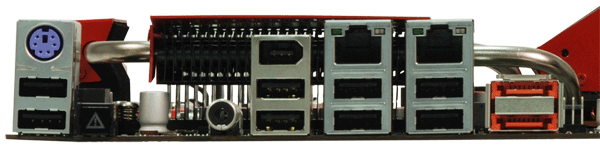
    Back Panel I/O Ports:
    1 x PS/2 keyboard port
    1 x S/PDIF Coaxial port
    1 x 1394 port
    2 x eSATA ports
    2 x RJ45 LAN ports
    8 x USB 2.0 ports
    Internal I/O Connectors:
    1 x ATX 24-Pin power connector
    1 x 8-Pin ATX 12V power connector
    1 x 4-Pin CPU Fan connector
    1 x 3-Pin System Fan connector
    1 x 3-Pin NB Fan connector
    2 x 3-Pin Fan connectors
    3 x Onboard On/Off/CCMOS/Force Reset buttons
    1 x IDE connector
    2 x USB 2.0 connectors support additional 4 ports
    1 x HDA header
    1 x Front Panel header
    6 x SATAII connectors
    1 x 1394 header
    1 x SONAR X-Fi Card
    BIOS Features:
    Dual 8Mb flash EEPROM w/ LAN boot PnP, ACPI, WfM, DMI
    Support CD:
    Drivers, Adobe Reader, Norton
    Standards/Manageability:
    PCI 2.3, USB2.0, DMI 2.5
    Special Features:
    * Quantum Force segment, based on Intel® X58 chipset
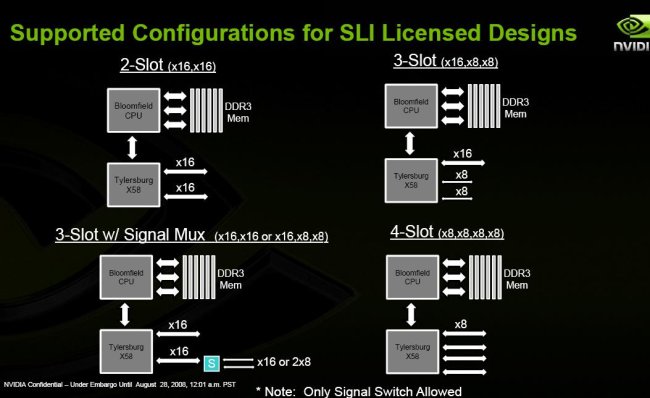
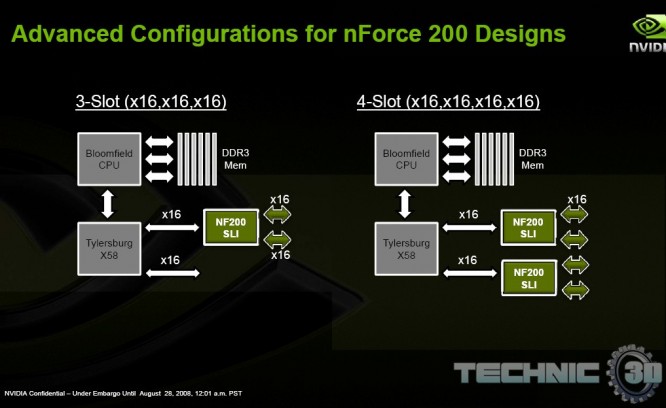
    * 4* PCIe x16 Gen 2.0 with ATI CrossFireX™ & NVIDIA® SLI™ support
    * Triple DDR3 1800(**oc)/1600/1333x 3 DIMMs, Max.12GB
    * 4in1 Quantum Cooler
    * 14 phase Digital PWM
    * Quantum BIOS
    * SONAR X-Fi audio card–7.1 channel HDA daughter card with 108dB DAC SNR/104dB
    * Quantum Flow and Quantum Lap unique accessories
    * 100% SOLID Capacitor design and Ferrite Choke
    Form Factor:
    ATX (12" x 9.6")
    3.Downloads
    =====MANUAL=====

    Manual Download

    =====Quantum Force Downloads (Drivers, Bios, Tuts, Utilities)=====

    Quantum Force Downloads

    =====Quantum Force Aegis Panel=====

    Aegis Panel

    4.Details zum x58 Chipsatz (Tylersbug)


    5. Luftkühlung
    Hier eine ausführliche Liste von passenden Kühlern ---> KLICK
    6.Wasserkühlung
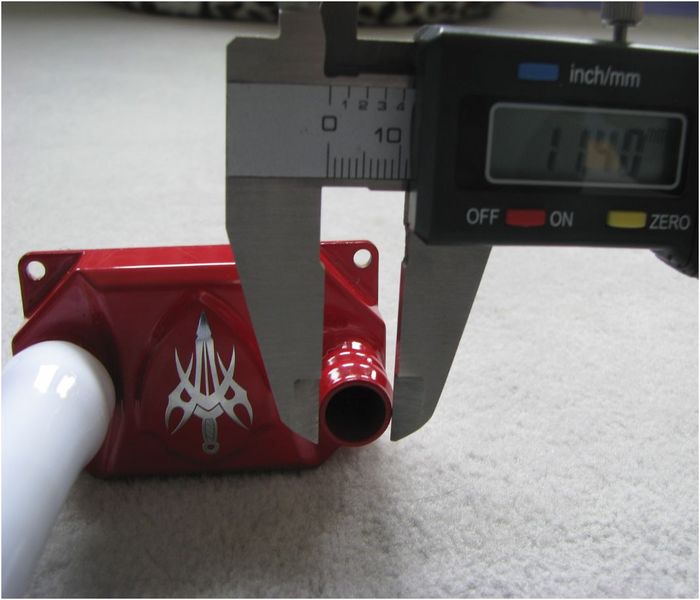
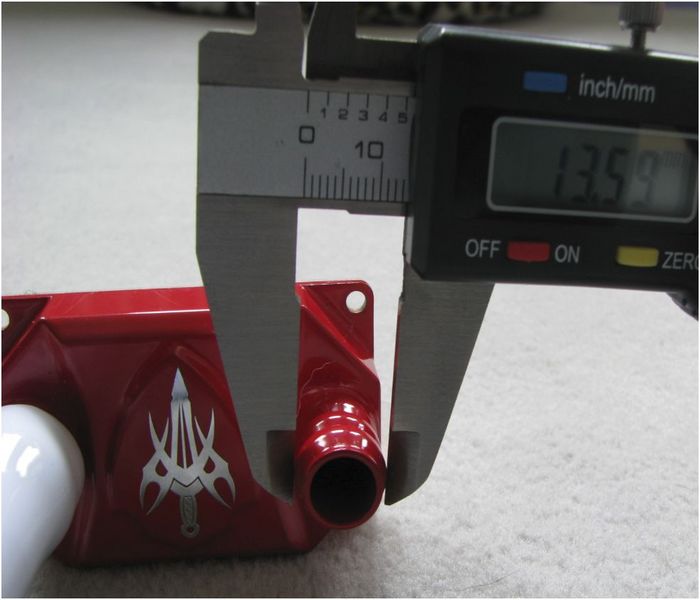
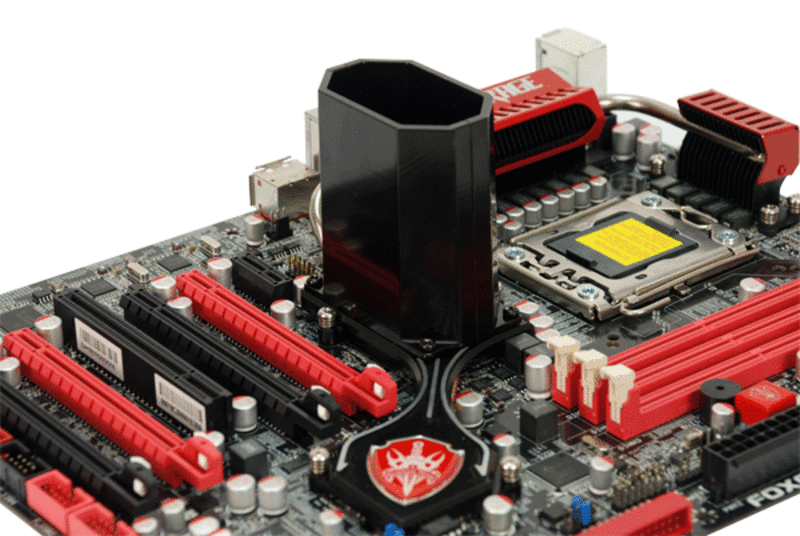
    Hier mal die Stock Masse des originalen NB Freezers. Danke an Jooney für die Pics:


    7.Bios Bilder
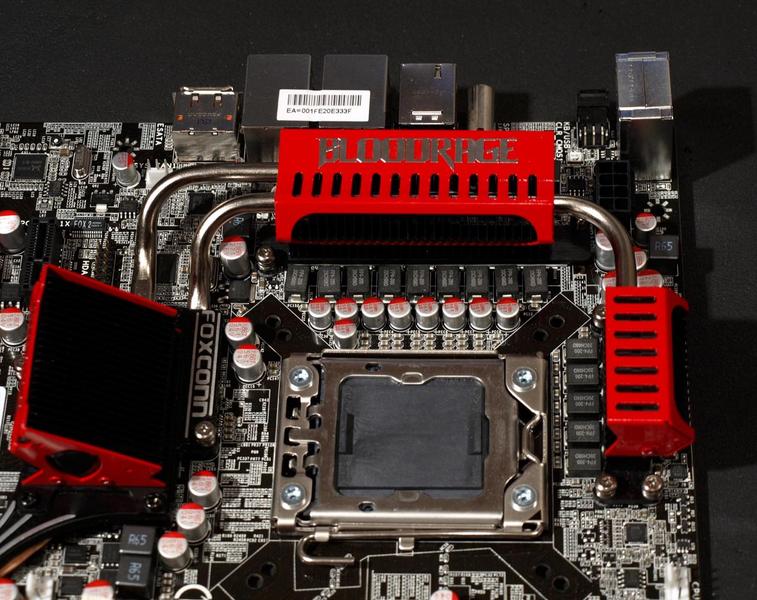
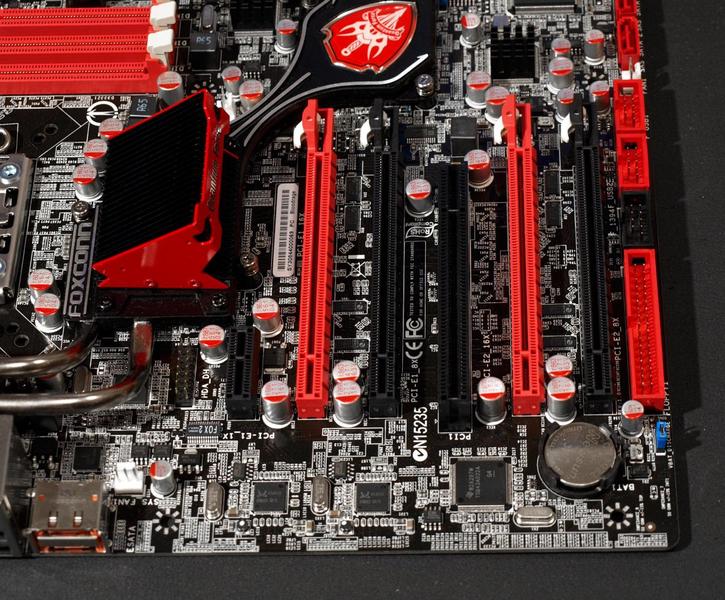
    8.Bilder des Boards
    9. Verpackung
    Kommt in der Retail Verpackung
    10. Frequently asked Questions

    11. Preise
    ab ca. 300 Euro KLICK
    12. Previews
    13. Debug Coes

    Spoiler: Anzeigen
    Award & Intel X58 Debug Codes:

    The most common Debug codes, what they mean, and how to work with them.
    This Guide is intended for the Foxconn QuantumForce BloodRage board, but the codes should be identical or very similar on all Mainboards with Award BIOSes (Gigabyte, DFI, etc)


    no LED all fans spinning
    If the Board powers on with all fans spinning and all LEDs running but the DEBUG display doesnt display any POST codes and nothing else happens, then the PWM probably cant get enough juice, there is no cpu installed or the installed cpu is damaged, broken, or not supported. But check if the 8Pin 12V plug and the 24Pin ATX PSU power plugs are plugged in properly, make sure they dont bend too much or haven a lose cable. Check another PSU if possible. If nothing helps, power off the mainboard, switch the vbat discharge jumper on the bottom left of the board to disconnect the battery and wait a few minutes, then set it back to default and power the mainboard on again. The default position for this jumper is 1-2, meaning the jumper should cover the left and middle pin.

    board shuts down, Debug LED flashes for half a second
    If the Board powers on when you push the power button but shuts off almost immediatly after that, and the debug LED display flashed for a fraction of a second, then check if the 8Pin 12v plug and the 24Pin ATX PSU power plugs are connected properly. Make sure the board doesnt bend too much and check another psu if possible. If nothing helps, power off the mainboard, switch the vbat discharge jumper on the bottom left of the board to disconnect the battery and wait a few minutes, then set it back to default and power the mainboard on again. The default position for this jumper is 1-2, meaning the jumper should cover the left and middle pin.

    E8 -> 01 -> b2 -> 00 looping
    If the board powers un and keeps looping from E8 to 01 to b2 to 00 and back to E8 again, check if the memory is installed properly and try to boot with only 1 stick and try each slot individually. If one of the slots doesnt work, please power off the mainboard and psu and check if any of the pins inside the 1366 CPU socket is bent. If yes then send me a pm or contact the foxconn tech support. If the pins are alright and he memory is plugged in properly, make sure you didnt misconfigure the memory controller and set an unsupported multiplier or an unsupported combination of multipliers. Reset the bios and try again. If it still doesnt work your memory might be damaged or the SPD corrupt, or simply not supported. Please check the BloodRage memory compatibility list and send me a pm if your memory is not on the list and doesnt seem to work.

    2b
    When the system powers on and the Debug LED shows the usual POST code sequence but hangs on 2b or you get a beep code as soon as the sequence reaches 2b, then the Mainboard cant detect your Videocard properly. Note that the POST code sequence might not halt at 2b but continue, so the final POST Code it displays could be FF, 00 or 7F which means the Maiboard booted, entered BIOS, or OC recovery kicked in and is waiting for Input to enter BIOS. Since the Videocard couldnt be detected properly you will only see a black Monitor and either 2b, FF, 00 or 7F. Check if there is something wrong with the Videocard, the PCIE slot or BUS, the Monitor or monitor cable. Turn the Monitor on and off, switch the Monitor cable from one D-SUB or DVI plug to the other in case your Videocard has two. If this doesnt help then reboot and load the optimized defaults. If that doesnt help either try another Videocard if possible, or try the Videocard in another system to make sure its working properly. Try another monitor or try the Monitor on another System.

    7F
    When the system detects that a critical error happened during the last boot attempt or several boot attempts failed, so OC recovery kicked in. There should be a message displayed on the Display informing you that OC revocery kicked in and that its waiting for your input to enter BIOS. If you cant see this message cause your Display stays black, please check the description for POST Code 2b.

    00
    Your in the BIOS right now, if you cant see the BIOS cause your Display stays black, please check the description for POST Code 2b. If this is part of a loop please check the point "E8 -> 01 -> b2 -> 00 looping" above.

    Intel MRC Code
    This block of code has to be implemented in every Intel based platform BIOS. It initializes and configures the processor and runs bus training and adusting routines. It adjusts clockskews, read/write leveling, signal termination resistors and several chipset timings dynamically depending on the trace length, signal quality, timing and memory installed in the motherboard. If the MRC code hangs or the board cant pas the MRC code and resets it usually points towards memory problems and unsupported multiplier settings or a unsupported combination of multipliers.


    Shut down If the board shuts down after a second and the Debug LEDs flash for a fraction of a second, the PWM cant get enough juice
    7F OC Recovery
    b0 Intel Core i7 MRC Code - Chipset - check above
    b1 Intel Core i7 MRC Code - Chipset - check above
    b2 Intel Core i7 MRC Code - Memory - check above
    b3 Intel Core i7 MRC Code - CPU - check above
    b4 Intel Core i7 MRC Code - Memory - check above
    b5 Intel Core i7 MRC Code - CPU - check above
    b6 Intel Core i7 MRC Code - Memory - check above
    b7 Intel Core i7 MRC Code - Memory - check above
    b8 Intel Core i7 MRC Code - Memory - check above
    01 Intel Core i7 MRC Code - Memory - check above
    02 Intel Core i7 MRC Code - Memory - check above
    03 Intel Core i7 MRC Code - Memory - check above
    04 Intel Core i7 MRC Code - Memory - check above
    05 Intel Core i7 MRC Code - CPU - check above
    b9 Intel Core i7 MRC Code - Memory - check above
    bA Intel Core i7 MRC Code - Memory - check above
    bb Intel Core i7 MRC Code - Memory - check above
    bc Intel Core i7 MRC Code - Memory - check above
    bd Intel Core i7 MRC Code - CPU - check above
    be Intel Core i7 MRC Code - CPU - check above
    bF Intel Core i7 MRC Code - CPU - check above
    dd unsupported Multiplier or unsupported combination of Multipliers

    A0 Reserved/Unused
    A1 Reserved/Unused
    A2 Reserved/Unused
    A3 Reserved/Unused
    A4 Reserved/Unused
    A5 Reserved/Unused
    A6 Reserved/Unused
    A7 Reserved/Unused
    A8 Reserved/Unused
    A9 Reserved/Unused
    AA Reserved/Unused
    Ab Reserved/Unused
    AC Reserved/Unused
    Ad Reserved/Unused
    AE Reserved/Unused
    AF Reserved/Unused
    b0 Error: Interupt in protected mode
    b1 Unclaimed NMI
    b2 Reserved/Unused
    b3 Reserved/Unused
    b4 Reserved/Unused
    b5 Reserved/Unused
    b6 Reserved/Unused
    b7 Reserved/Unused
    b8 Reserved/Unused
    b9 Reserved/Unused
    bA Reserved/Unused
    bb Reserved/Unused
    bC Reserved/Unused
    bd Reserved/Unused
    bE Reserved/Unused
    bF Program Chipset
    C0 CPU status flag test, CPU register test, memory refresh test
    C1 Detect memory, Auto-detection of DRAM size, type and ECC, Auto-detection of L2 cache
    C2 Early memory initialization
    C3 Extended memory initialization
    C4 Display switch configuration
    C5 Call chipset hook to copy BIOS back to E000 & F000 in shadow, prepare fastboot hook
    C6 External Cache detection
    C7 Reserved/Unused
    C8 Reserved/Unused
    C9 Reserved/Unused
    CA Reserved/Unused
    Cb Reserved/Unused
    CC Reserved/Unused
    Cd Reserved/Unused
    CE Reserved/Unused
    CF Cmos integrity check
    d0 Reserved/Unused
    d1 Reserved/Unused
    d2 Reserved/Unused
    d3 Reserved/Unused
    d4 Reserved/Unused
    d5 Reserved/Unused
    d6 Reserved/Unused
    d7 Reserved/Unused
    d8 Reserved/Unused
    d9 Reserved/Unused
    dA Reserved/Unused
    db Reserved/Unused
    dC Reserved/Unused
    dd Reserved/Unused
    dE Reserved/Unused
    dF Reserved/Unused
    E0 Reserved/Unused
    E1 Set up Page1
    E2 Set up Page3
    E3 Set up Page3
    E4 Set up Page4
    E5 Set up Page5
    E6 Set up Page6
    E7 Set up Page7
    E8 Set up Page8
    E9 Set up Page9
    EA Set up Page10
    Eb Set up Page11
    EC Set up Page12
    Ed Set up Page13
    EE Set up Page14
    EF Set up Page15
    FF booting (from Int 19h) [If the Debug LEDs show FF but the Display stays black, possibly combined with one long and two short beep codes, check the detailled description of POST code 2b on the top]
    00 Your in the BIOS menu right now (if part of a loop check above)
    01 Force chipset defaults
    02 Reserved/Unused
    03 Initial Superio_Early_Init switch
    04 Reserved/Unused
    05 Blank out screen, Clear CMOS error flag
    06 Reserved/Unused
    07 Clear 8042 interface, Initialize 8042 self-test
    08 Test special keboard controller for Winbond 977 series superIO chips, enable keyboard interface
    09 Reserved/Unused
    0A Detect PS/2 mouse/keyboard
    0b Detect Onboard Audio
    0C Reserved/Unused
    0d Reserved/Unused
    0E CMOS Integrity Check
    0F Reserved/Unused
    10 Auto Detect EEPROM
    11 Reserved/Unused
    12 CMOS Check
    13 Reserved/Unused
    14 Program Chipset registers with CMOS values
    15 Reserved/Unused
    16 Clock Init
    17 Reserved/Unused
    18 Identify CPU and Init L1/L2 cache
    19 Reserved/Unused
    1A Reserved/Unused
    1b Set up Interupt Vector Table
    1C Reserved/Unused
    1d Early Processor Management Init
    1E Finished Loading BIOS Menu
    1F Re-Init Keyboard
    20 Reserved/Unused
    21 HPM initialization (notebook platform)
    22 Reserved/Unused
    23 Check validity of RTC value: e.g. a value of 5Ah is an invalid value for RTC minute. Load CMOS settings into BIOS stack. If CMOS checksum fails, use the default values instead. Prepare BIOS resource map for PCI & PnP use. If ESCD is valid, take into consideration of the ESCD's legacy information. Onboard clock generator initialization. Disable respective clock resource to empty PCI & DIMM slots. Early PCI initialization: Enumerate PCI bus number, Assign memory & I/O resource, search for valid VGA device & VGA BIOS and put it into C000:0
    24 Reserved/Unused
    25 Reserved/Unused
    26 Reserved/Unused
    27 Initialize KBC and prepare INT 09 buffer to load BIOS Data
    28 Reserved/Unused
    29 Read CMOS 14h to detect video adapter
    2A Reserved/Unused
    2b Invoke vga BIOS
    2C Reserved/Unused
    2d VGA Bios loaded, initializing display output, display VGA BIOS details, Award BIOS details, CPU type, CPU speed etc
    2E Reserved/Unused
    2F Reserved/Unused
    30 Reserved/Unused
    31 Reserved/Unused
    32 Reserved/Unused
    33 Set up PS2 Mouse and reset keyboard (except Winbond 977 series Super I/O chips)
    34 Reserved/Unused
    35 Test DMA Channel 0
    36 Reserved/Unused
    37 Test DMA Channel 1
    38 Reserved/Unused
    39 Test DMA Page Registers
    3A Reserved/Unused
    3b Reserved/Unused
    3C Test 8254 Timer 0 Counter 2
    3d Reserved/Unused
    3E Test if 8259 Channel 1 interrupt bits are masked correctly by turning the interupt lines on and off
    3F Reserved/Unused
    40 Test if 8259 Channel 2 interrupt bits are masked correctly by turning the interupt lines on and off
    41 Reserved/Unused
    42 Reserved/Unused
    43 Test 8259 Interup Functionality
    44 Reserved/Unused
    45 Reserved/Unused
    46 Reserved/Unused
    47 Initialize EISA slot
    48 Reserved/Unused
    49 Extend base memory from 256K to 640K and extend memory above 1MB
    4A Reserved/Unused
    4b Reserved/Unused
    4C Reserved/Unused
    4d Reserved/Unused
    4E Test base memory from 256K to 640K and extend memory above 1MB with various patterns
    4F Reserved/Unused
    50 Initialize USB
    51 Reserved/Unused
    52 Test all memory above 1MB in virtual 8086 mode
    53 Reserved/Unused
    54 Reserved/Unused
    55 Detect CPU Speed, display CPU String and enable additional CPU features
    56 Reserved/Unused
    57 Display PnP logo
    58 Reserved/Unused
    59 Initialize Virus protection
    5A Early Chipset, VGA, SuperIO and Interface Init
    5b (Optional Feature) Show message for entering AWDFLASH.EXE from FDD
    5C Chipset defaults loaded
    5d Initialize Onboard SuperIO (Floppy, Hardwaremonitor, legacy ports and buses)
    5E Set up Interup Vector Table
    5F Test CMOS Interface and Battery Status
    60 Okay to enter Setup utility, users can not enter the CMOS setup utility before this POST stage
    61 Init VGA
    62 Test video memory
    63 Detect and Initialize basic Mouse driver
    64 Test 8259
    65 Initialize PS/2 Mouse
    66 Detect Boot Devices
    67 ACPI Init
    68 PM Init
    69 Init Cache Controller
    6A Reserved/Unused
    6b Program chipset registers according to items described in Setup & Auto-configuration table
    6C Reserved/Unused
    6d Init Floppy controller
    6E Reserved/Unused
    6F Detect Floppy drives
    70 Reserved/Unused
    71 Reserved/Unused
    72 Reserved/Unused
    73 Init PATA/SATA HDD Controller
    74 Reserved/Unused
    75 Detect PATA/SATA HDDs
    76 Reserved/Unused
    77 detect serial ports & parallel ports (including the Game Port)
    78 Reserved/Unused
    79 Reserved/Unused
    7A detect & install math co-processors
    7b Reserved/Unused
    7C Check HDD Write protection Flag
    7d Reserved/Unused
    7E Reserved/Unused
    7F Switch back to text mode if full screen logo is supported. If error occur, report errors & wait for keys. If no errors occur or F1 key is pressed to contine: Clear EPA or customization logo, On FOXCONN boards: OC recovery kicked in, waiting for input to enter BIOS (if your monitor stays black check if the board beeped during POST code 2b, if yes see POST code 2b)
    80 preparing to boot
    81 Reserved/Unused
    82 Request BIOS Password
    83 Save all CMOS Data to DRAM
    84 Enable NMI, partiy checker and cache
    85 Initialize additional Onboard Controllers and USB devices
    86 Reserved/Unused
    87 Reserved/Unused
    88 Reserved/Unused
    89 Reserved/Unused
    8A Reserved/Unused
    8b reserved - might be PPM/Turbo initialization
    8C Reserved/Unused
    8d Reserved/Unused
    8E Reserved/Unused
    8F Reserved/Unused
    90 Reserved/Unused
    91 Reserved/Unused
    92 Reserved/Unused
    93 Enable Boot Sector Protection
    94 Final Processor and Chipset initialization
    95 program daylight saving, update keyboard LED & typematic rate and default Numlock setting
    96 build MP table, build & update ESCD, set CMOS century to 20h or 19h, load CMOSD time into DOS timer tick, build MSIRQ routing table
    97 Reserved/Unused
    98 Reserved/Unused
    99 Reserved/Unused
    9A Reserved/Unused
    9b Reserved/Unused
    9C Reserved/Unused
    9d Reserved/Unused
    9E Reserved/Unused
    9F Reserved/Unused
    FF booting (from Int 19h) [If the Debug LEDs show FF but the Display stays black, possibly combined with one long and two short beep codes, check the detailled description of POST code 2b on the top]


    Normal Boot Sequence:
    This is the sequence of POST codes you should see when booting up, note that some of them only flash on for a fraction of a second

    b8 Intel Core i7 MRC Code - check above
    b9 Intel Core i7 MRC Code - check above
    1F Intel Core i7 MRC Code - check above
    C1 Detect memory, Auto-detection of DRAM size, type and ECC, Auto-detection of L2 cache
    C3 Expand compressed BIOS codes to DRAM
    02 reserved
    03 Initial Superio_Early_Init switch
    A0 Detect PS/2 mouse/keyboard
    A1 reserved
    2b Invoke vga BIOS
    2d VGA Bios loaded, initializing display output, display VGA BIOS details, Award BIOS details, CPU type, CPU speed etc
    33 Reset keyboard except Winbond 977 series Super I/O chips
    49 Calculate total memory by testing the last double word of each 64K page
    4E Program MTTR of M1 CPU, Initialize L2 cache for P6 class CPU & program CPU with proper cacheable range, Initialize the APIC for P6 class CPU, On MP platform, adjust the cacheable range to smaller one in case the cacheable ranges between each CPU are not identical.
    50 Initialize USB
    52 Test all memory (clear all extended memory to 0)
    75 detect & install all IDE devices: HDD, LS120, ZIP, CDROM etc
    8b reserved - might be PPM/Turbo initialization
    94 enable L2 cache, program boot up speed, chipet final initialization, power management final initialization, clear screen & display summary table, program K6 compatible write allocation, program P6 class compatible write combining
    96 build MP table, build & update ESCD, set CMOS century to 20h or 19h, load CMOSD time into DOS timer tick, build MSIRQ routing table
    FF booting (Int 19h) If the Debug LEDs show FF but the Display stays black, check the detailled description of POST code 2b on the top

  2. #2
    Flottillenadmiral Avatar von iNpaniC
    Registriert seit
    15.05.2006
    Ort
    Bayern
    Beiträge
    4.352


    • Systeminfo
      • Motherboard:
      • EVGA p67 SLI
      • CPU:
      • 2600k
      • Kühlung:
      • Kokü (Single Stage)
      • Gehäuse:
      • Benchetto
      • RAM:
      • 8 GB Gskill Ripchar
      • Grafik:
      • 580 GTX (ab und zu SLI)
      • Storage:
      • Vertex 3
      • Monitor:
      • 26° Fujitsu
      • Netzteil:
      • 1 KW Corsair
      • Betriebssystem:
      • Win7+XP
      • Handy:
      • Iphone 3GS

    Standard

    Hat schon jemand die Mushkin redline oder Gskill trident auf dem board laufen/gehabt? Meine elendigen Dr**srams laufen ums verrecken nicht stabil, deswegen müssen neue her

  3. #3
    Mainboard-Guru Avatar von Sven Bode
    Registriert seit
    04.10.2002
    Ort
    Am Ende der Nahrungskette
    Beiträge
    25.671


    • Systeminfo
      • Motherboard:
      • Asus Rampage Extreme 3
      • CPU:
      • Intel 980x
      • Kühlung:
      • WaKü / Chiller
      • Gehäuse:
      • Dimastech Easy V. 2.5
      • RAM:
      • 12GB BBSE Mushkin 998691
      • Grafik:
      • GTX 480 SLI @ WaKü
      • Storage:
      • 2TB
      • Monitor:
      • Viewsonic VX2835wm
      • Netzteil:
      • Thermaltake 1000W
      • Betriebssystem:
      • Windows 7 Ultimate x64
      • Notebook:
      • Acer Extensa 5220

    Standard

    GSkill Trident 2000 laufen bei mir auf dem Bloodrage ohne Probleme


    Rechne mit ungeahnten Konsequenzen....

    OC ist kein Wunschkonzert - entweder man gibt der CPU das was sie haben will oder man lässt es


    Kompromiss? Kompromiss?! Mach Dein Scheiss doch allein!!

  4. #4
    Oberbootsmann
    Registriert seit
    03.07.2005
    Ort
    localhost
    Beiträge
    797


    • Systeminfo
      • Motherboard:
      • Foxconn Bloodrage GTI @ H²O
      • CPU:
      • Intel Xeon W3520 @ HK 3.0
      • Systemname:
      • C-B 4.1
      • Kühlung:
      • aquastream XT Ultra • EVO 1080
      • Gehäuse:
      • Lian Li PC-P60 Armorsuit
      • RAM:
      • OCZ Platinum Low-Voltage 6GB D
      • Grafik:
      • PoV GeForce GTX275 @ aquagraFX
      • Storage:
      • SSD 128 GB • HDD 500 + 1000 GB
      • Monitor:
      • Dell UltraSharp 2709W • Acer AL1714
      • Sound:
      • Creative Sound Blaster X-Fi Titanium
      • Netzteil:
      • be quiet DarkPower Pro P7 750W
      • Betriebssystem:
      • Windows 7 Ultimate x64
      • Notebook:
      • Asus A8SC (14.1" • T7100 1,8 GHz • GF 8400M • 2GB DDR2-667 • 160GB • Windows 7 Ultimate x86)
      • Photoequipment:
      • Canon EOS 1000D • 18-55mm F3.5-5.6
      • Handy:
      • HTC Touch HD @ Sense 2.5.1922

    Standard

    die lassen sich aber auch unendlich viel zeit für die scheiß quantum-force.net seite... bis die fertig is is das board schon längst in rente -.-
    wie siehts eigentlich mit bios aus? das P07 is net grad das grüne vom ei :\
    power. Intel Xeon W3520 @ 4200MHz, H²O • Foxconn Bloodrage @ H²O • OCZ Platinum 6GB @ 1600MHz CL7 • be quiet Dark Power Pro P7 750W
    senses. GeForce GTX 275 @ H²O • Dell UltraSharp U2711 [27"] ++ Samsung SyncMaster BX2235 LED [22"] • Creative X-Fi Titanium
    storage. ST Ultradrive GX MLC 128GB • Samsung SpinPoint T166 500GB ++ WD Caviar Black 1TB ++ WD Caviar Green 2TB
    cooling. Aqua Computer aquastream XT Ultra • Aqua Computer Airplex Evo 1080

  5. #5
    Flottillenadmiral Avatar von iNpaniC
    Registriert seit
    15.05.2006
    Ort
    Bayern
    Beiträge
    4.352


    • Systeminfo
      • Motherboard:
      • EVGA p67 SLI
      • CPU:
      • 2600k
      • Kühlung:
      • Kokü (Single Stage)
      • Gehäuse:
      • Benchetto
      • RAM:
      • 8 GB Gskill Ripchar
      • Grafik:
      • 580 GTX (ab und zu SLI)
      • Storage:
      • Vertex 3
      • Monitor:
      • 26° Fujitsu
      • Netzteil:
      • 1 KW Corsair
      • Betriebssystem:
      • Win7+XP
      • Handy:
      • Iphone 3GS

    Standard

    In der ruhe liegt die kraft *hust*

    Naja ich kann das G25 empfehlen, läuft bei mir am besten, und dank 6er ramteiler auch ohne weitere größere probleme (220BCLK+) stabil.

  6. #6
    Vizeadmiral
    Registriert seit
    12.02.2007
    Ort
    München
    Beiträge
    7.078


    Standard

    Zitat Zitat von iNpaniC Beitrag anzeigen
    Hat schon jemand die Mushkin redline oder Gskill trident auf dem board laufen/gehabt? Meine elendigen Dr**srams laufen ums verrecken nicht stabil, deswegen müssen neue her
    jo ich hatte die mal da drauf gehabt. ist schon ewig her. aber die liefen.

  7. #7
    Leutnant zur See Avatar von 3ullit
    Registriert seit
    06.02.2009
    Beiträge
    1.078


    • Systeminfo
      • Motherboard:
      • Foxconn Bloodrage
      • CPU:
      • i7 965 @3,2/4GHz
      • Kühlung:
      • H2O
      • Gehäuse:
      • Lian Li PC-P80
      • RAM:
      • Corsair Dominator GT
      • Grafik:
      • eVGA GTX 295
      • Storage:
      • Samsung F1 1TB
      • Netzteil:
      • Enermax Revolution
      • Betriebssystem:
      • Windows 7 64-Bit
      • Notebook:
      • Asus Z53S

    Standard

    Zitat Zitat von jack2jack Beitrag anzeigen
    Eher QPI oder VDIMM, aber beim i7 hab ich da noch keine ganz klare tendenz gesehen.
    QPI? Wie nennt die sich den beim BloodRage? Habe gerade beim überfliegen der Spannung nichts gefunden...

  8. #8
    Oberstabsgefreiter Avatar von jack2jack
    Registriert seit
    06.11.2007
    Ort
    Münster
    Beiträge
    479


    Standard

    CPU/VTT mein ich natürlich.
    Sys.: Foxconn Bloodrage, Core i7 920, Corsair Dominator, ST UD ME 64GB, Coba Nitrox 750W, Cosmos S, Gainward GS4850, HP w2207h, Emu 0404

    My Space

  9. #9
    Flottillenadmiral Avatar von iNpaniC
    Registriert seit
    15.05.2006
    Ort
    Bayern
    Beiträge
    4.352


    • Systeminfo
      • Motherboard:
      • EVGA p67 SLI
      • CPU:
      • 2600k
      • Kühlung:
      • Kokü (Single Stage)
      • Gehäuse:
      • Benchetto
      • RAM:
      • 8 GB Gskill Ripchar
      • Grafik:
      • 580 GTX (ab und zu SLI)
      • Storage:
      • Vertex 3
      • Monitor:
      • 26° Fujitsu
      • Netzteil:
      • 1 KW Corsair
      • Betriebssystem:
      • Win7+XP
      • Handy:
      • Iphone 3GS

    Standard

    So, die trident sind ne wucht, 1000@8-9-9-20 ohne irgendwelche einstellungen, werde es mal weiter testen

  10. #10
    Oberbootsmann
    Registriert seit
    03.07.2005
    Ort
    localhost
    Beiträge
    797


    • Systeminfo
      • Motherboard:
      • Foxconn Bloodrage GTI @ H²O
      • CPU:
      • Intel Xeon W3520 @ HK 3.0
      • Systemname:
      • C-B 4.1
      • Kühlung:
      • aquastream XT Ultra • EVO 1080
      • Gehäuse:
      • Lian Li PC-P60 Armorsuit
      • RAM:
      • OCZ Platinum Low-Voltage 6GB D
      • Grafik:
      • PoV GeForce GTX275 @ aquagraFX
      • Storage:
      • SSD 128 GB • HDD 500 + 1000 GB
      • Monitor:
      • Dell UltraSharp 2709W • Acer AL1714
      • Sound:
      • Creative Sound Blaster X-Fi Titanium
      • Netzteil:
      • be quiet DarkPower Pro P7 750W
      • Betriebssystem:
      • Windows 7 Ultimate x64
      • Notebook:
      • Asus A8SC (14.1" • T7100 1,8 GHz • GF 8400M • 2GB DDR2-667 • 160GB • Windows 7 Ultimate x86)
      • Photoequipment:
      • Canon EOS 1000D • 18-55mm F3.5-5.6
      • Handy:
      • HTC Touch HD @ Sense 2.5.1922

    Standard

    wieso kann ich bei awdflash den dateinamen nicht bestätigen? =\ hab in die autoexec.bat dateinamen reingeschrieben und dann kommt beim booten dieses "fenster" und der text da blinkt aber ich kann weder mit usb noch mit ps2 tasta bestätigen... wer ne idee?
    power. Intel Xeon W3520 @ 4200MHz, H²O • Foxconn Bloodrage @ H²O • OCZ Platinum 6GB @ 1600MHz CL7 • be quiet Dark Power Pro P7 750W
    senses. GeForce GTX 275 @ H²O • Dell UltraSharp U2711 [27"] ++ Samsung SyncMaster BX2235 LED [22"] • Creative X-Fi Titanium
    storage. ST Ultradrive GX MLC 128GB • Samsung SpinPoint T166 500GB ++ WD Caviar Black 1TB ++ WD Caviar Green 2TB
    cooling. Aqua Computer aquastream XT Ultra • Aqua Computer Airplex Evo 1080

  11. #11
    Leutnant zur See Avatar von 3ullit
    Registriert seit
    06.02.2009
    Beiträge
    1.078


    • Systeminfo
      • Motherboard:
      • Foxconn Bloodrage
      • CPU:
      • i7 965 @3,2/4GHz
      • Kühlung:
      • H2O
      • Gehäuse:
      • Lian Li PC-P80
      • RAM:
      • Corsair Dominator GT
      • Grafik:
      • eVGA GTX 295
      • Storage:
      • Samsung F1 1TB
      • Netzteil:
      • Enermax Revolution
      • Betriebssystem:
      • Windows 7 64-Bit
      • Notebook:
      • Asus Z53S

    Standard

    Ich kann dir leider nicht sagen wie du dieses Problem beheben kannst, aber wenn du die Datei die in der .zip Datei enthalten ist mit dem Text Editor öffnest und dort den BIOS Namen einträgst, musst du beim flashen überhaupt nichts mehr machen aus zusehen.
    Angehängte Dateien Angehängte Dateien

  12. #12
    Oberbootsmann
    Registriert seit
    03.07.2005
    Ort
    localhost
    Beiträge
    797


    • Systeminfo
      • Motherboard:
      • Foxconn Bloodrage GTI @ H²O
      • CPU:
      • Intel Xeon W3520 @ HK 3.0
      • Systemname:
      • C-B 4.1
      • Kühlung:
      • aquastream XT Ultra • EVO 1080
      • Gehäuse:
      • Lian Li PC-P60 Armorsuit
      • RAM:
      • OCZ Platinum Low-Voltage 6GB D
      • Grafik:
      • PoV GeForce GTX275 @ aquagraFX
      • Storage:
      • SSD 128 GB • HDD 500 + 1000 GB
      • Monitor:
      • Dell UltraSharp 2709W • Acer AL1714
      • Sound:
      • Creative Sound Blaster X-Fi Titanium
      • Netzteil:
      • be quiet DarkPower Pro P7 750W
      • Betriebssystem:
      • Windows 7 Ultimate x64
      • Notebook:
      • Asus A8SC (14.1" • T7100 1,8 GHz • GF 8400M • 2GB DDR2-667 • 160GB • Windows 7 Ultimate x86)
      • Photoequipment:
      • Canon EOS 1000D • 18-55mm F3.5-5.6
      • Handy:
      • HTC Touch HD @ Sense 2.5.1922

    Standard

    ja.. ich hatte es erst vergessen zu ändern weil ich die exe vom p07 genommen hab (sollte normalerweise ja auch gehen), aber als ich gemerkt hab dass das prompt keine tastatur annimmt, hab ich in der autoexec.bat gleich den richtigen bios namen eingegeben... aber es geht einfach nicht automatisch weiter und drücken kann ich auch nix... hab ne ganze weile gewartet, weil das kann ja ne kurze zeit dauern bis das anfängt... aber bleibt da einfach stehen ^^
    power. Intel Xeon W3520 @ 4200MHz, H²O • Foxconn Bloodrage @ H²O • OCZ Platinum 6GB @ 1600MHz CL7 • be quiet Dark Power Pro P7 750W
    senses. GeForce GTX 275 @ H²O • Dell UltraSharp U2711 [27"] ++ Samsung SyncMaster BX2235 LED [22"] • Creative X-Fi Titanium
    storage. ST Ultradrive GX MLC 128GB • Samsung SpinPoint T166 500GB ++ WD Caviar Black 1TB ++ WD Caviar Green 2TB
    cooling. Aqua Computer aquastream XT Ultra • Aqua Computer Airplex Evo 1080

  13. #13
    Leutnant zur See Avatar von 3ullit
    Registriert seit
    06.02.2009
    Beiträge
    1.078


    • Systeminfo
      • Motherboard:
      • Foxconn Bloodrage
      • CPU:
      • i7 965 @3,2/4GHz
      • Kühlung:
      • H2O
      • Gehäuse:
      • Lian Li PC-P80
      • RAM:
      • Corsair Dominator GT
      • Grafik:
      • eVGA GTX 295
      • Storage:
      • Samsung F1 1TB
      • Netzteil:
      • Enermax Revolution
      • Betriebssystem:
      • Windows 7 64-Bit
      • Notebook:
      • Asus Z53S

    Standard

    Ich habe mich absolut unverständlich ausgedrückt glaube Ich, also, du nimmst die Datei aus der .zip, schreibst dort statt dem g25 das P07 BIOS hinein, und kopierst die Datei dann so zum BIOS und der Autoexe auf die Diskette/Stick. Nach dem Starten sollte der Flashvorgang ohne jegliche Eingabe von selbst beginnen.

  14. #14
    Oberbootsmann
    Registriert seit
    03.07.2005
    Ort
    localhost
    Beiträge
    797


    • Systeminfo
      • Motherboard:
      • Foxconn Bloodrage GTI @ H²O
      • CPU:
      • Intel Xeon W3520 @ HK 3.0
      • Systemname:
      • C-B 4.1
      • Kühlung:
      • aquastream XT Ultra • EVO 1080
      • Gehäuse:
      • Lian Li PC-P60 Armorsuit
      • RAM:
      • OCZ Platinum Low-Voltage 6GB D
      • Grafik:
      • PoV GeForce GTX275 @ aquagraFX
      • Storage:
      • SSD 128 GB • HDD 500 + 1000 GB
      • Monitor:
      • Dell UltraSharp 2709W • Acer AL1714
      • Sound:
      • Creative Sound Blaster X-Fi Titanium
      • Netzteil:
      • be quiet DarkPower Pro P7 750W
      • Betriebssystem:
      • Windows 7 Ultimate x64
      • Notebook:
      • Asus A8SC (14.1" • T7100 1,8 GHz • GF 8400M • 2GB DDR2-667 • 160GB • Windows 7 Ultimate x86)
      • Photoequipment:
      • Canon EOS 1000D • 18-55mm F3.5-5.6
      • Handy:
      • HTC Touch HD @ Sense 2.5.1922

    Standard

    aso, ok.. ich war so im zeitstress ich dachte du hättest da ne umgeschriebene autoexec.bat drin ^^ werds morgen früh mal ausprobieren ^^ danke schonmal
    power. Intel Xeon W3520 @ 4200MHz, H²O • Foxconn Bloodrage @ H²O • OCZ Platinum 6GB @ 1600MHz CL7 • be quiet Dark Power Pro P7 750W
    senses. GeForce GTX 275 @ H²O • Dell UltraSharp U2711 [27"] ++ Samsung SyncMaster BX2235 LED [22"] • Creative X-Fi Titanium
    storage. ST Ultradrive GX MLC 128GB • Samsung SpinPoint T166 500GB ++ WD Caviar Black 1TB ++ WD Caviar Green 2TB
    cooling. Aqua Computer aquastream XT Ultra • Aqua Computer Airplex Evo 1080

  15. #15
    Oberbootsmann
    Registriert seit
    03.07.2005
    Ort
    localhost
    Beiträge
    797


    • Systeminfo
      • Motherboard:
      • Foxconn Bloodrage GTI @ H²O
      • CPU:
      • Intel Xeon W3520 @ HK 3.0
      • Systemname:
      • C-B 4.1
      • Kühlung:
      • aquastream XT Ultra • EVO 1080
      • Gehäuse:
      • Lian Li PC-P60 Armorsuit
      • RAM:
      • OCZ Platinum Low-Voltage 6GB D
      • Grafik:
      • PoV GeForce GTX275 @ aquagraFX
      • Storage:
      • SSD 128 GB • HDD 500 + 1000 GB
      • Monitor:
      • Dell UltraSharp 2709W • Acer AL1714
      • Sound:
      • Creative Sound Blaster X-Fi Titanium
      • Netzteil:
      • be quiet DarkPower Pro P7 750W
      • Betriebssystem:
      • Windows 7 Ultimate x64
      • Notebook:
      • Asus A8SC (14.1" • T7100 1,8 GHz • GF 8400M • 2GB DDR2-667 • 160GB • Windows 7 Ultimate x86)
      • Photoequipment:
      • Canon EOS 1000D • 18-55mm F3.5-5.6
      • Handy:
      • HTC Touch HD @ Sense 2.5.1922

    Standard

    mh.. versteh deine beschreibung net.. ich kann mir nicht vorstellen wie ne datei namens "runme.bat" ausgeführt werden soll und eine awdflash.bat gibt es auch nicht.
    ich habs jetzt nochmal versucht zu flashen und wenigstens stand nach paar sek nicht mehr "please insert file name!" oder sowas da sondern "please wait!"... nur habe ich jetzt 45 min gewartet und es hat sich nichts getan :\ ich verstehs net... awdflash ging bei allen meinen boards bisher problemlos :\
    funzt winflash bei dem board?
    power. Intel Xeon W3520 @ 4200MHz, H²O • Foxconn Bloodrage @ H²O • OCZ Platinum 6GB @ 1600MHz CL7 • be quiet Dark Power Pro P7 750W
    senses. GeForce GTX 275 @ H²O • Dell UltraSharp U2711 [27"] ++ Samsung SyncMaster BX2235 LED [22"] • Creative X-Fi Titanium
    storage. ST Ultradrive GX MLC 128GB • Samsung SpinPoint T166 500GB ++ WD Caviar Black 1TB ++ WD Caviar Green 2TB
    cooling. Aqua Computer aquastream XT Ultra • Aqua Computer Airplex Evo 1080

  16. #16
    Leutnant zur See Avatar von 3ullit
    Registriert seit
    06.02.2009
    Beiträge
    1.078


    • Systeminfo
      • Motherboard:
      • Foxconn Bloodrage
      • CPU:
      • i7 965 @3,2/4GHz
      • Kühlung:
      • H2O
      • Gehäuse:
      • Lian Li PC-P80
      • RAM:
      • Corsair Dominator GT
      • Grafik:
      • eVGA GTX 295
      • Storage:
      • Samsung F1 1TB
      • Netzteil:
      • Enermax Revolution
      • Betriebssystem:
      • Windows 7 64-Bit
      • Notebook:
      • Asus Z53S

    Standard

    Okay, dann anders...

    Pack die Dateien in dem Archiv auf einen Bootstick, dazu das P07 BIOS und es sollte rennen.
    Angehängte Dateien Angehängte Dateien

  17. #17
    Oberbootsmann
    Registriert seit
    03.07.2005
    Ort
    localhost
    Beiträge
    797


    • Systeminfo
      • Motherboard:
      • Foxconn Bloodrage GTI @ H²O
      • CPU:
      • Intel Xeon W3520 @ HK 3.0
      • Systemname:
      • C-B 4.1
      • Kühlung:
      • aquastream XT Ultra • EVO 1080
      • Gehäuse:
      • Lian Li PC-P60 Armorsuit
      • RAM:
      • OCZ Platinum Low-Voltage 6GB D
      • Grafik:
      • PoV GeForce GTX275 @ aquagraFX
      • Storage:
      • SSD 128 GB • HDD 500 + 1000 GB
      • Monitor:
      • Dell UltraSharp 2709W • Acer AL1714
      • Sound:
      • Creative Sound Blaster X-Fi Titanium
      • Netzteil:
      • be quiet DarkPower Pro P7 750W
      • Betriebssystem:
      • Windows 7 Ultimate x64
      • Notebook:
      • Asus A8SC (14.1" • T7100 1,8 GHz • GF 8400M • 2GB DDR2-667 • 160GB • Windows 7 Ultimate x86)
      • Photoequipment:
      • Canon EOS 1000D • 18-55mm F3.5-5.6
      • Handy:
      • HTC Touch HD @ Sense 2.5.1922

    Standard

    habs gerade ausprobiert... geht genau so wenig =( "please wait!" blinkt für immer...
    gibts da vllt irgendne protection im bios von der ich nix weiß oder so? x.0
    power. Intel Xeon W3520 @ 4200MHz, H²O • Foxconn Bloodrage @ H²O • OCZ Platinum 6GB @ 1600MHz CL7 • be quiet Dark Power Pro P7 750W
    senses. GeForce GTX 275 @ H²O • Dell UltraSharp U2711 [27"] ++ Samsung SyncMaster BX2235 LED [22"] • Creative X-Fi Titanium
    storage. ST Ultradrive GX MLC 128GB • Samsung SpinPoint T166 500GB ++ WD Caviar Black 1TB ++ WD Caviar Green 2TB
    cooling. Aqua Computer aquastream XT Ultra • Aqua Computer Airplex Evo 1080

  18. #18
    Leutnant zur See Avatar von 3ullit
    Registriert seit
    06.02.2009
    Beiträge
    1.078


    • Systeminfo
      • Motherboard:
      • Foxconn Bloodrage
      • CPU:
      • i7 965 @3,2/4GHz
      • Kühlung:
      • H2O
      • Gehäuse:
      • Lian Li PC-P80
      • RAM:
      • Corsair Dominator GT
      • Grafik:
      • eVGA GTX 295
      • Storage:
      • Samsung F1 1TB
      • Netzteil:
      • Enermax Revolution
      • Betriebssystem:
      • Windows 7 64-Bit
      • Notebook:
      • Asus Z53S

    Standard

    Wie steckt bei dir der BIOS Select Jumper?

    Edit: besteht das Problem nur bei diesem BIOS oder auch bei anderen z.B. dem G25?
    Geändert von 3ullit (28.07.09 um 18:45 Uhr)

  19. #19
    Oberbootsmann
    Registriert seit
    03.07.2005
    Ort
    localhost
    Beiträge
    797


    • Systeminfo
      • Motherboard:
      • Foxconn Bloodrage GTI @ H²O
      • CPU:
      • Intel Xeon W3520 @ HK 3.0
      • Systemname:
      • C-B 4.1
      • Kühlung:
      • aquastream XT Ultra • EVO 1080
      • Gehäuse:
      • Lian Li PC-P60 Armorsuit
      • RAM:
      • OCZ Platinum Low-Voltage 6GB D
      • Grafik:
      • PoV GeForce GTX275 @ aquagraFX
      • Storage:
      • SSD 128 GB • HDD 500 + 1000 GB
      • Monitor:
      • Dell UltraSharp 2709W • Acer AL1714
      • Sound:
      • Creative Sound Blaster X-Fi Titanium
      • Netzteil:
      • be quiet DarkPower Pro P7 750W
      • Betriebssystem:
      • Windows 7 Ultimate x64
      • Notebook:
      • Asus A8SC (14.1" • T7100 1,8 GHz • GF 8400M • 2GB DDR2-667 • 160GB • Windows 7 Ultimate x86)
      • Photoequipment:
      • Canon EOS 1000D • 18-55mm F3.5-5.6
      • Handy:
      • HTC Touch HD @ Sense 2.5.1922

    Standard

    also da nix beschriftet is und ich nix geändert hab müsste es auf default 5-6 stecken, also 'bios select, default rom 1'
    ich geh mal net davon aus dass bei awdflash ne oc-protection drin is oder? weil ich net auf stock laufen hab...
    power. Intel Xeon W3520 @ 4200MHz, H²O • Foxconn Bloodrage @ H²O • OCZ Platinum 6GB @ 1600MHz CL7 • be quiet Dark Power Pro P7 750W
    senses. GeForce GTX 275 @ H²O • Dell UltraSharp U2711 [27"] ++ Samsung SyncMaster BX2235 LED [22"] • Creative X-Fi Titanium
    storage. ST Ultradrive GX MLC 128GB • Samsung SpinPoint T166 500GB ++ WD Caviar Black 1TB ++ WD Caviar Green 2TB
    cooling. Aqua Computer aquastream XT Ultra • Aqua Computer Airplex Evo 1080

  20. #20
    Leutnant zur See Avatar von 3ullit
    Registriert seit
    06.02.2009
    Beiträge
    1.078


    • Systeminfo
      • Motherboard:
      • Foxconn Bloodrage
      • CPU:
      • i7 965 @3,2/4GHz
      • Kühlung:
      • H2O
      • Gehäuse:
      • Lian Li PC-P80
      • RAM:
      • Corsair Dominator GT
      • Grafik:
      • eVGA GTX 295
      • Storage:
      • Samsung F1 1TB
      • Netzteil:
      • Enermax Revolution
      • Betriebssystem:
      • Windows 7 64-Bit
      • Notebook:
      • Asus Z53S

    Standard

    Kann Ich dir nicht sagen, aber sag, warum gehst du das Risiko ein nicht @Stock zu flashen, danach ist doch eh alles weg.

  21. #21
    Oberbootsmann
    Registriert seit
    03.07.2005
    Ort
    localhost
    Beiträge
    797


    • Systeminfo
      • Motherboard:
      • Foxconn Bloodrage GTI @ H²O
      • CPU:
      • Intel Xeon W3520 @ HK 3.0
      • Systemname:
      • C-B 4.1
      • Kühlung:
      • aquastream XT Ultra • EVO 1080
      • Gehäuse:
      • Lian Li PC-P60 Armorsuit
      • RAM:
      • OCZ Platinum Low-Voltage 6GB D
      • Grafik:
      • PoV GeForce GTX275 @ aquagraFX
      • Storage:
      • SSD 128 GB • HDD 500 + 1000 GB
      • Monitor:
      • Dell UltraSharp 2709W • Acer AL1714
      • Sound:
      • Creative Sound Blaster X-Fi Titanium
      • Netzteil:
      • be quiet DarkPower Pro P7 750W
      • Betriebssystem:
      • Windows 7 Ultimate x64
      • Notebook:
      • Asus A8SC (14.1" • T7100 1,8 GHz • GF 8400M • 2GB DDR2-667 • 160GB • Windows 7 Ultimate x86)
      • Photoequipment:
      • Canon EOS 1000D • 18-55mm F3.5-5.6
      • Handy:
      • HTC Touch HD @ Sense 2.5.1922

    Standard

    kp war halt zu faul zum resetten... kann man das board mit winflash flashen?
    power. Intel Xeon W3520 @ 4200MHz, H²O • Foxconn Bloodrage @ H²O • OCZ Platinum 6GB @ 1600MHz CL7 • be quiet Dark Power Pro P7 750W
    senses. GeForce GTX 275 @ H²O • Dell UltraSharp U2711 [27"] ++ Samsung SyncMaster BX2235 LED [22"] • Creative X-Fi Titanium
    storage. ST Ultradrive GX MLC 128GB • Samsung SpinPoint T166 500GB ++ WD Caviar Black 1TB ++ WD Caviar Green 2TB
    cooling. Aqua Computer aquastream XT Ultra • Aqua Computer Airplex Evo 1080

  22. #22
    Leutnant zur See Avatar von 3ullit
    Registriert seit
    06.02.2009
    Beiträge
    1.078


    • Systeminfo
      • Motherboard:
      • Foxconn Bloodrage
      • CPU:
      • i7 965 @3,2/4GHz
      • Kühlung:
      • H2O
      • Gehäuse:
      • Lian Li PC-P80
      • RAM:
      • Corsair Dominator GT
      • Grafik:
      • eVGA GTX 295
      • Storage:
      • Samsung F1 1TB
      • Netzteil:
      • Enermax Revolution
      • Betriebssystem:
      • Windows 7 64-Bit
      • Notebook:
      • Asus Z53S

    Standard

    Es müsste auf der beigelegten CD sogar ein Programm sein mit dem man flashen kann.

    Hast du mir nicht den Tipp zu MemTest gegeben das das wegen RAID nicht läuft, hier vielleicht selbiges Problem, speicher deine Settings doch flott, setz das Ganze dann @ Default und versuchs nochmal.

    Meine Frage wegen einem anderen BIOS hast du mir auch noch nicht beantwortet.
    Was mich auch noch interessieren würde: warum das P07, Ich meine es gäbe als neuere Optionen schon das P08 oder als Beta eben das G25.

  23. #23
    Oberbootsmann
    Registriert seit
    03.07.2005
    Ort
    localhost
    Beiträge
    797


    • Systeminfo
      • Motherboard:
      • Foxconn Bloodrage GTI @ H²O
      • CPU:
      • Intel Xeon W3520 @ HK 3.0
      • Systemname:
      • C-B 4.1
      • Kühlung:
      • aquastream XT Ultra • EVO 1080
      • Gehäuse:
      • Lian Li PC-P60 Armorsuit
      • RAM:
      • OCZ Platinum Low-Voltage 6GB D
      • Grafik:
      • PoV GeForce GTX275 @ aquagraFX
      • Storage:
      • SSD 128 GB • HDD 500 + 1000 GB
      • Monitor:
      • Dell UltraSharp 2709W • Acer AL1714
      • Sound:
      • Creative Sound Blaster X-Fi Titanium
      • Netzteil:
      • be quiet DarkPower Pro P7 750W
      • Betriebssystem:
      • Windows 7 Ultimate x64
      • Notebook:
      • Asus A8SC (14.1" • T7100 1,8 GHz • GF 8400M • 2GB DDR2-667 • 160GB • Windows 7 Ultimate x86)
      • Photoequipment:
      • Canon EOS 1000D • 18-55mm F3.5-5.6
      • Handy:
      • HTC Touch HD @ Sense 2.5.1922

    Standard

    ich will doch das G25 flashen ^^ ich dachte ich hätte das weiter oben schon erwähnt aber war wohl nicht herauszulesen... ich hab standard schon das P07 drauf gehabt... auf der foxconn seite gibts nur das P07 und quantum-force.net is ja noch bis 2012 ne baustelle ^^
    hab win7 drauf, wenn ich damit die CD öffne wird genau GAR KEIN prog in der liste aufgeführt in dem fenster ^^ und auf der cd direkt weiß ich netmehr ob ich da rumgeguckt hab, fand es eher uninteressant was da für sachen drauf sind... kann ja mal schaun ^^
    power. Intel Xeon W3520 @ 4200MHz, H²O • Foxconn Bloodrage @ H²O • OCZ Platinum 6GB @ 1600MHz CL7 • be quiet Dark Power Pro P7 750W
    senses. GeForce GTX 275 @ H²O • Dell UltraSharp U2711 [27"] ++ Samsung SyncMaster BX2235 LED [22"] • Creative X-Fi Titanium
    storage. ST Ultradrive GX MLC 128GB • Samsung SpinPoint T166 500GB ++ WD Caviar Black 1TB ++ WD Caviar Green 2TB
    cooling. Aqua Computer aquastream XT Ultra • Aqua Computer Airplex Evo 1080

  24. #24
    Leutnant zur See Avatar von 3ullit
    Registriert seit
    06.02.2009
    Beiträge
    1.078


    • Systeminfo
      • Motherboard:
      • Foxconn Bloodrage
      • CPU:
      • i7 965 @3,2/4GHz
      • Kühlung:
      • H2O
      • Gehäuse:
      • Lian Li PC-P80
      • RAM:
      • Corsair Dominator GT
      • Grafik:
      • eVGA GTX 295
      • Storage:
      • Samsung F1 1TB
      • Netzteil:
      • Enermax Revolution
      • Betriebssystem:
      • Windows 7 64-Bit
      • Notebook:
      • Asus Z53S

    Standard

    Zitat Zitat von N!ghty Beitrag anzeigen
    ...weil ich die exe vom p07 genommen hab...
    Habe Ich dann wohl falsch verstanden... da könnte auch der Fehler liegen...

    So, nun zu den Dateien das G25 BIOS, und es sollte tatsächlich laufen...
    Angehängte Dateien Angehängte Dateien

  25. #25
    Oberbootsmann
    Registriert seit
    03.07.2005
    Ort
    localhost
    Beiträge
    797


    • Systeminfo
      • Motherboard:
      • Foxconn Bloodrage GTI @ H²O
      • CPU:
      • Intel Xeon W3520 @ HK 3.0
      • Systemname:
      • C-B 4.1
      • Kühlung:
      • aquastream XT Ultra • EVO 1080
      • Gehäuse:
      • Lian Li PC-P60 Armorsuit
      • RAM:
      • OCZ Platinum Low-Voltage 6GB D
      • Grafik:
      • PoV GeForce GTX275 @ aquagraFX
      • Storage:
      • SSD 128 GB • HDD 500 + 1000 GB
      • Monitor:
      • Dell UltraSharp 2709W • Acer AL1714
      • Sound:
      • Creative Sound Blaster X-Fi Titanium
      • Netzteil:
      • be quiet DarkPower Pro P7 750W
      • Betriebssystem:
      • Windows 7 Ultimate x64
      • Notebook:
      • Asus A8SC (14.1" • T7100 1,8 GHz • GF 8400M • 2GB DDR2-667 • 160GB • Windows 7 Ultimate x86)
      • Photoequipment:
      • Canon EOS 1000D • 18-55mm F3.5-5.6
      • Handy:
      • HTC Touch HD @ Sense 2.5.1922

    Standard

    hab ich alles doch schon gemacht, is ja net so als wär ich neu bei der sache, das is ja gerade das problem
    aber falls es wirklich irgendwo (wo überhaupt?) das P08 gibt, müsste dieses ja theoretisch die offizielle ver. nach G25 sein oder?
    power. Intel Xeon W3520 @ 4200MHz, H²O • Foxconn Bloodrage @ H²O • OCZ Platinum 6GB @ 1600MHz CL7 • be quiet Dark Power Pro P7 750W
    senses. GeForce GTX 275 @ H²O • Dell UltraSharp U2711 [27"] ++ Samsung SyncMaster BX2235 LED [22"] • Creative X-Fi Titanium
    storage. ST Ultradrive GX MLC 128GB • Samsung SpinPoint T166 500GB ++ WD Caviar Black 1TB ++ WD Caviar Green 2TB
    cooling. Aqua Computer aquastream XT Ultra • Aqua Computer Airplex Evo 1080

+ Antworten
Seite 1 von 42 1 2 3 4 5 11 ... LetzteLetzte

Berechtigungen

  • Neue Themen erstellen: Nein
  • Themen beantworten: Nein
  • Anhänge hochladen: Nein
  • Beiträge bearbeiten: Nein